Lead Scoring Automation CRM: The Complete Guide to Smarter Lead Management
Every sales team has faced the same frustrating reality, a pipeline full of leads, no clear way to tell who's ready to buy, and reps wasting hours chasing contacts that were never going to convert.
That's not a strategy problem. That's a lead scoring problem.
When your CRM lacks proper lead scoring automation, your sales cycle stretches, your team burns out, and your revenue growth stalls. The good news? The right CRM with built-in lead scoring automation can change all of that and it doesn't require a massive tech overhaul to get started.
This guide breaks down everything you need to know about lead scoring automation in CRM, how it works, which tools are worth your investment, and how to build a system that actually moves the needle for your business.
What Is Lead Scoring Automation in CRM and Why Does It Matter?
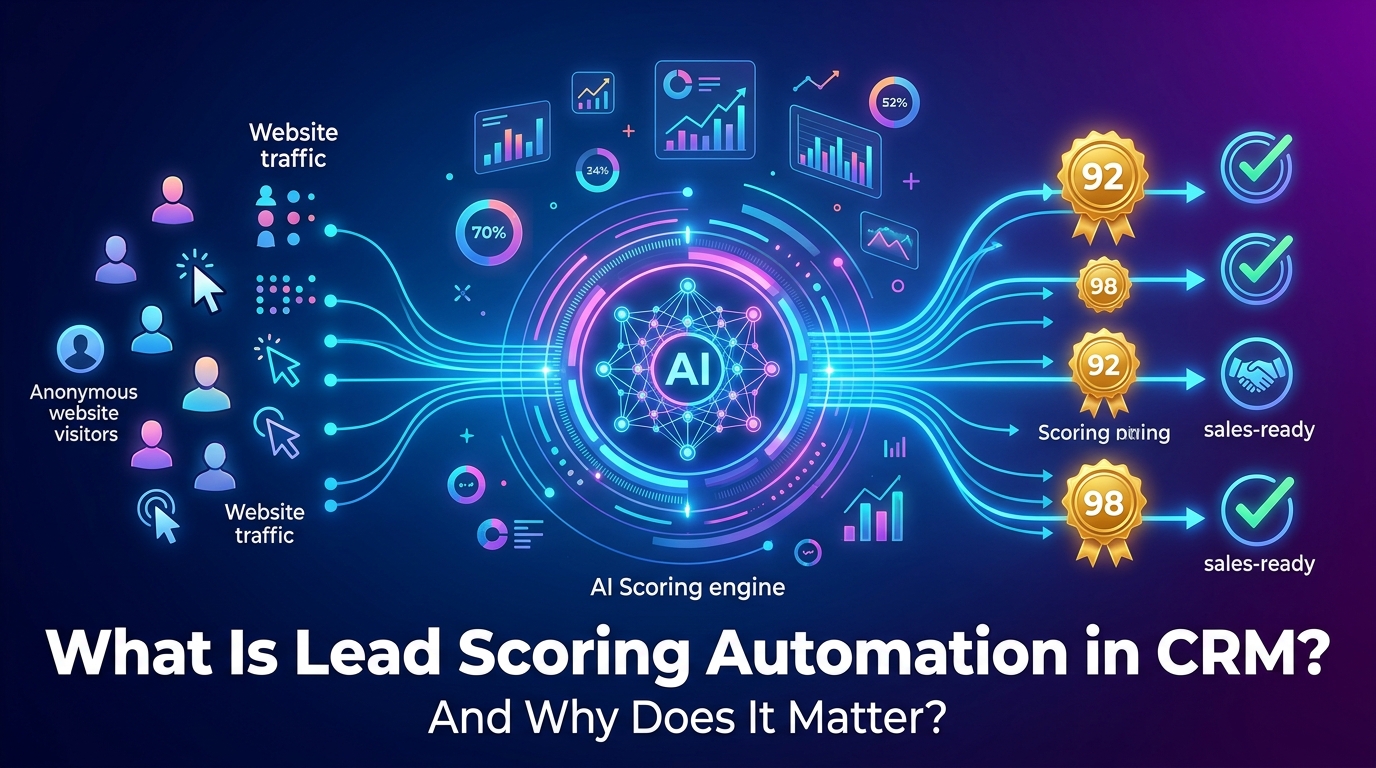
Lead scoring is the process of assigning a numerical value to each lead based on how closely they match your ideal customer profile and how actively they're engaging with your brand. When this process runs automatically inside your CRM, it's called lead scoring automation.
Instead of your sales reps manually reviewing every contact and making judgment calls, your CRM does the heavy lifting tracking behavior, pulling in firmographic data, and assigning scores in real time.
The result? Your team wakes up every morning knowing exactly which leads to call first.
The Real Cost of Manual Lead Qualification for Sales Teams
Manual lead qualification is expensive not just in dollars, but in time, energy, and missed opportunities.
Research consistently shows that sales reps spend a significant portion of their week on non-selling activities. Sorting through leads, updating records, and deciding who to follow up with first ranks among the biggest time drains in any sales organization.
Here's what that actually costs you:
Slower response times: By the time a rep identifies a hot lead manually, that prospect may have already moved on to a competitor
Inconsistent prioritization: Different reps score leads differently, creating unpredictable pipeline quality
Revenue leakage: High-intent leads fall through the cracks when there's no automated system catching them
Sales and marketing misalignment: Marketing sends leads that sales considers unqualified, creating friction between teams
Longer sales cycles: Without clear scoring signals, reps spend time nurturing leads that aren't ready, delaying pipeline velocity
For Canadian businesses especially, where sales teams are often leaner and expected to do more with less, manual lead qualification is a growth bottleneck that automated CRM systems can eliminate.
How CRM Lead Scoring Automation Changes the Sales Game
A CRM with built-in lead scoring automation removes human guesswork from the qualification process. Instead of relying on a rep's gut feeling, your system tracks every meaningful touchpoint, from the first website visit to the third demo request and translates that activity into a clear, actionable score.
When a lead crosses your defined threshold, your CRM can automatically route that contact to the right sales rep, trigger a follow-up sequence, or flag the account for immediate outreach. No delays. No dropped balls.
This creates a compounding advantage over time. Your reps build momentum working qualified leads. Your pipeline becomes more predictable. And your revenue forecasting gets significantly more accurate.
Behavioral Scoring vs Demographic Scoring — What's the Difference?
These two scoring dimensions work together to give you a complete picture of each lead.
Behavioral scoring tracks what a lead does, the actions they take that signal buying intent. This includes visiting your pricing page, downloading a resource, opening emails, attending a webinar, or requesting a demo. The more high-intent actions a lead takes, the higher their behavioral score climbs.
Demographic scoring evaluates who a lead is, their job title, company size, industry, geographic location, and other firmographic attributes that indicate fit. A CFO at a mid-market manufacturing company in Ontario scores differently than a student browsing your blog from a university email address.
The most effective lead scoring models use both dimensions simultaneously, creating a two-axis scoring matrix that separates high-fit, high-intent leads from everyone else.
AI Lead Scoring vs Traditional Lead Scoring Models
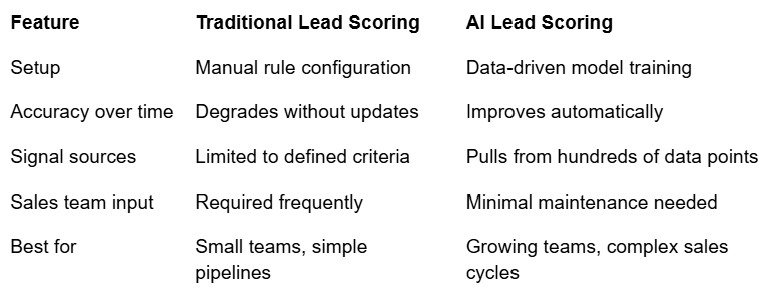
Traditional lead scoring is rule-based. Your team defines which actions earn which points, sets thresholds manually, and updates the model periodically based on feedback from sales.
AI-powered lead scoring takes a fundamentally different approach. Instead of following static rules, the system analyzes historical conversion data, identifies patterns across thousands of leads, and continuously refines its scoring logic based on outcomes.
The practical difference is significant:
Which Lead Scoring Model Is Right for Your Business?
If you're just getting started with lead scoring automation, a well-structured traditional model is the right first step. It gives you visibility into your scoring logic, helps your team understand the system, and produces meaningful results quickly.
As your CRM accumulates data and your sales volume grows, transitioning to a predictive AI lead scoring model becomes a natural evolution, one that pays dividends in pipeline accuracy and rep efficiency.
How Does Lead Scoring Automation Work Inside a CRM?
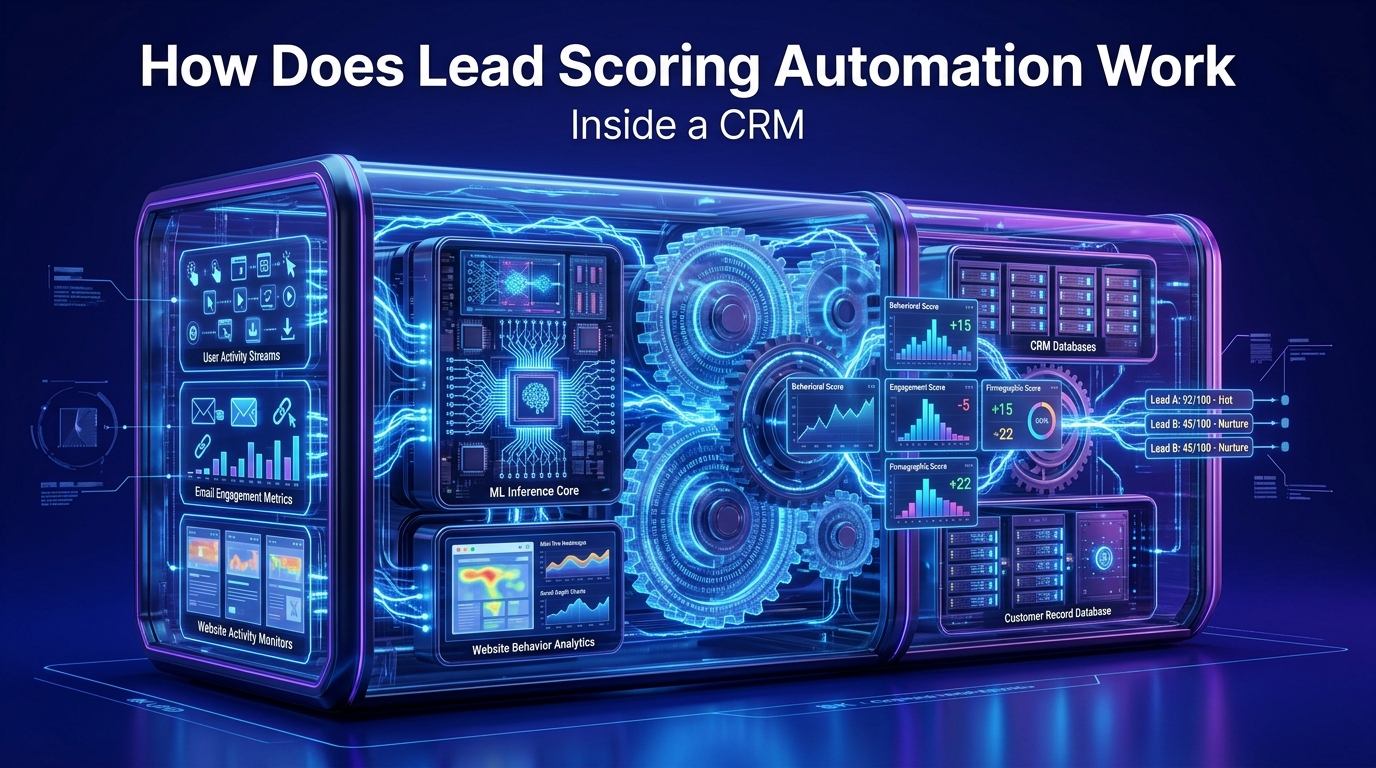
Understanding the mechanics behind CRM lead scoring automation helps you build a better system and get more out of your existing tools.
At its core, the process works in four stages: data collection, signal weighting, score calculation, and automated action triggering. Your CRM runs this cycle continuously, updating scores in real time as leads engage with your brand.
Key Data Signals Your CRM Uses to Score Leads Automatically
Not all lead activity carries equal weight. A strong lead scoring system distinguishes between signals that indicate casual browsing and signals that indicate serious buying intent.
Here are the most valuable data signals your CRM should be capturing:
Behavioral Signals — Website Visits, Email Opens, Demo Requests
Behavioral signals are the clearest indicators of buying intent because they reflect deliberate choices a lead makes. High-value behavioral signals include:
Pricing page visits: One of the strongest intent signals available. A lead reviewing your pricing is actively evaluating your solution
Demo requests or free trial signups: Bottom-of-funnel actions that indicate serious consideration
Email click-throughs: Especially clicks on product-focused or case study emails
Webinar attendance: Leads who show up live are significantly more engaged than those who register and don't attend
Content downloads: Particularly gated content like comparison guides, ROI calculators, or implementation templates
Return website visits: Multiple sessions within a short window often signal a lead progressing through their decision process
Chat interactions: Leads who initiate conversations with your sales or support team are actively seeking information
Each of these actions earns a defined point value in your CRM. The cumulative score tells you where a lead sits in their buying journey.
Firmographic & Demographic Signals — Industry, Company Size, Location
Firmographic data answers the question: is this lead actually a good fit for what we sell? Even a highly engaged lead scores lower if they fall outside your target customer profile.
Key demographic and firmographic signals include:
Job title and seniority Decision-makers and budget holders score higher than end users
Company size If your solution targets mid-market companies, a two-person startup scores differently than a 500-person enterprise
Industry vertical Some industries align naturally with your product; others don't
Geographic location For businesses serving specific regions like Canada, location is a meaningful qualifier
Technology stack Tools a company already uses can signal compatibility or displacement opportunities
How Predictive Lead Scoring Uses AI to Prioritize Pipeline
Predictive lead scoring goes beyond tracking what leads do today — it uses historical conversion data to forecast which leads are most likely to convert in the future.
The system analyzes patterns across your entire pipeline, identifying which combinations of behaviors, demographics, and engagement timelines have historically produced closed deals. It then applies those patterns to your current leads, surfacing the highest-probability opportunities at the top of your queue.
For sales teams managing large pipelines, this is a game-changer. Instead of reps spending time on leads that look engaged but rarely convert, your system continuously learns what a real buyer looks like and points your team directly at them.
Real-Time Lead Routing and Lead Distribution Automation
Lead routing is where scoring automation directly accelerates revenue. Once a lead hits your defined score threshold, your CRM doesn't just flag it — it acts on it.
Automated lead routing can:
Assign leads to the right rep based on territory, industry expertise, or account size
Trigger immediate follow-up sequences — a timed email, a task reminder, or an SMS alert
Notify sales managers when a high-value lead enters the queue
Move leads through pipeline stages automatically based on score progression
Redistribute leads if a rep doesn't respond within a defined window
How CRM Automation Tools Trigger Sales Actions Based on Score Thresholds
Think of score thresholds as decision gates inside your CRM. You define what score means what — and your system executes the corresponding action automatically.
A common threshold structure looks like this:
0–30 points — Lead enters nurture sequence; marketing continues engagement
31–60 points — Lead is flagged for soft outreach; rep receives notification
61–80 points — Lead is assigned directly to a sales rep with a follow-up task created
81–100 points — Lead triggers immediate high-priority alert; rep contacts within the hour
This structure ensures no lead falls through the cracks and every rep knows exactly what level of urgency each contact requires.
Best Lead Scoring Software and CRM Tools for Sales Teams in 2026
The market for CRM and lead scoring software has matured significantly. The best platforms today don't just store contact data — they actively help your team identify and convert the right leads faster.
Here's an honest look at the top options, with a focus on what each tool actually delivers for sales teams.
What to Look for in a CRM with Lead Scoring Features
Before diving into specific tools, it's worth being clear about what separates a capable lead scoring CRM from one that just checks boxes on a feature list.
The best platforms share these core characteristics:
Must-Have Features — Lead Tracking, Pipeline Management, Marketing Automation
Automated lead scoring engine with customizable scoring rules
Real-time lead tracking across website, email, and campaign touchpoints
Pipeline management with stage-based automation triggers
CRM and marketing automation integration in a single platform
Lead routing and distribution with assignment rules
Reporting and analytics that show scoring accuracy and pipeline impact
Contact database with enrichment capabilities
Sales engagement tools for follow-up sequencing
Free vs Paid Lead Scoring CRM Tools — What Canada-Based Teams Should Know
Several strong CRM platforms offer lead scoring features on free or entry-level plans — making them accessible for growing Canadian businesses that aren't ready to commit to enterprise pricing.
That said, free tiers typically limit the number of contacts, scoring rules, or automation triggers available. For teams serious about using lead scoring as a core sales driver, investing in a paid plan unlocks the full system — and the ROI typically justifies the cost quickly.
1. Agile CRM — Best All-in-One Lead Scoring Automation CRM
Agile CRM stands out as one of the most complete lead scoring automation platforms available for small to mid-sized sales teams. It combines contact management, lead scoring, marketing automation, and sales pipeline tools inside a single interface — without the complexity or cost of enterprise platforms.
What makes Agile CRM particularly well-suited for teams focused on lead scoring automation is the depth of its scoring configuration. You can score leads based on email interactions, website behavior, social activity, custom events, and demographic data — all within the same platform where your reps manage their pipeline.
Agile CRM Key Features for Lead Scoring
Automated lead scoring based on behavior, demographics, and custom criteria
Real-time website visitor tracking with score updates triggered by page visits
Email marketing automation with score adjustments based on open and click activity
Lead routing with assignment rules tied to score thresholds
Sales pipeline management with drag-and-drop interface and automation triggers
Contact timeline showing every interaction in chronological order
360-degree contact view combining CRM data, social profiles, and engagement history
Custom scoring rules that let you weight any action or attribute according to your sales model
Reporting dashboard that surfaces your highest-scoring leads and pipeline health metrics
Agile CRM Pricing
Agile CRM offers one of the most competitive pricing structures in the CRM market, making it a strong option for Canadian businesses looking for full-featured lead scoring automation without enterprise-level costs.
Free Plan — Up to 10 users, basic CRM features, and limited automation
Starter Plan — Full marketing automation and lead scoring features at an accessible monthly rate
Regular Plan — Advanced reporting, additional integrations, and expanded automation capacity
Enterprise Plan — Full platform access, dedicated support, and custom configuration options
The free plan gives teams a meaningful starting point to explore lead scoring before committing to a paid tier — which is rare among platforms offering this level of functionality.
Who Should Use Agile CRM?
Agile CRM is the right choice for sales and marketing teams that want a unified platform for lead scoring, pipeline management, and marketing automation — without managing multiple tools or paying for features they won't use.
It's particularly well-suited for:
Small to mid-sized businesses building their first formal lead scoring system
Canadian sales teams looking for a cost-effective CRM with marketing automation built in
B2B companies that need to qualify leads across longer, multi-touch sales cycles
Teams transitioning away from manual lead qualification who want a clear, configurable scoring model
2. HubSpot — Best for CRM and Marketing Automation Platforms
HubSpot is one of the most widely used CRM and marketing automation platforms globally, and for good reason. Its lead scoring tools are intuitive, its integrations are extensive, and its free CRM tier gives teams a genuine starting point.
HubSpot's predictive lead scoring — available on higher-tier plans — uses historical data to surface high-probability leads automatically. For teams already using HubSpot for email marketing or content, adding lead scoring to the mix is a natural extension of the platform.
The main consideration is cost. As your team scales and needs more advanced scoring and automation features, HubSpot pricing escalates significantly. It's a premium option that delivers premium results — but it requires a real budget commitment.
Best for: Marketing-driven organizations with established content and email programs looking for deep CRM and marketing automation integration.
3. Salesforce — Best Predictive Lead Scoring for Enterprise Sales Teams
Salesforce's Einstein Lead Scoring is among the most sophisticated predictive lead scoring systems available. It analyzes your historical CRM data to identify which lead attributes and behaviors correlate most strongly with conversions — then automatically scores incoming leads against that model.
For enterprise sales organizations with complex, multi-stage pipelines and large contact databases, Salesforce delivers unmatched depth. The platform's ecosystem of integrations, reporting capabilities, and customization options makes it the de facto choice for large teams.
The trade-off is implementation complexity and cost. Salesforce requires meaningful configuration, and most enterprise deployments benefit from dedicated admin support. For smaller Canadian businesses, it's often more platform than necessary.
Best for: Enterprise sales teams with large pipelines, dedicated CRM administrators, and complex multi-product sales cycles.
4. ActiveCampaign — Best CRM Marketing Automation for SMBs
ActiveCampaign combines email marketing, CRM, and lead scoring in a platform specifically designed for small and mid-sized businesses. Its lead scoring system is highly visual and easy to configure — making it accessible for teams without dedicated marketing operations resources.
Where ActiveCampaign particularly shines is in connecting lead scores to automated email and nurture sequences. When a lead's score changes, the platform can automatically shift them into a different campaign track, ensuring your outreach always matches where a contact sits in their journey.
Best for: SMBs that want tight integration between email marketing automation and CRM lead scoring without a steep learning curve.
5. Zoho CRM — Best Budget-Friendly Lead Management Platform
Zoho CRM offers solid lead scoring capabilities at a price point that's accessible for growing businesses. Its scoring system integrates with Zoho's broader suite of business tools — including email, analytics, and customer support — giving teams a connected view of each lead across multiple touchpoints.
Zoho's AI assistant, Zia, adds a layer of predictive intelligence to the scoring model — surfacing insights about lead quality and conversion probability based on CRM activity patterns.
Best for: Budget-conscious teams looking for a capable CRM with lead scoring and broad software ecosystem integration.
Quick Comparison Table — CRM Lead Scoring Tools at a Glance
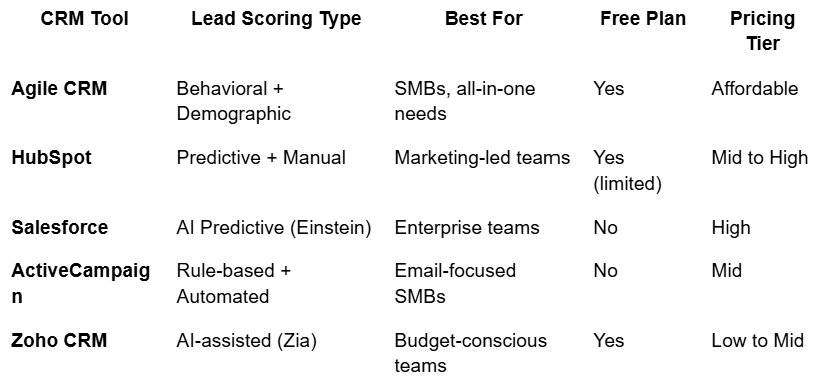
Lead Scoring Best Practices and How to Build Your Automation System

Knowing which tools exist is only half the equation. The other half is knowing how to build a lead scoring system that actually reflects your buyers' journey and drives consistent results.
Here's a practical, step-by-step framework your team can implement regardless of which CRM platform you choose.
Step-by-Step: How to Set Up Lead Scoring Automation in Your CRM
Step 1 — Define Your Ideal Customer Profile and Scoring Criteria
Before you assign a single point value, you need clarity on who your best customers actually are. Pull data from your existing closed-won deals and identify the common attributes — industry, company size, job title, geographic region, and company revenue.
This becomes your Ideal Customer Profile (ICP). Leads that closely match your ICP start with a higher baseline demographic score. Leads that don't match receive lower scores — or negative scores in categories where the mismatch is a deal-breaker.
Step 2 — Map Behavioral and Demographic Signals to Score Values
Once your ICP is defined, list every meaningful touchpoint a lead could have with your brand and assign a point value to each based on its correlation with conversion.
A practical starting framework:
Pricing page visit: +15 points
Demo request: +30 points
Email click-through: +5 points
Webinar attendance: +20 points
Job title matches ICP: +20 points
Company size matches ICP: +15 points
Unsubscribed from email: −10 points
No activity in 60 days: −20 points
These values aren't permanent — they're a starting hypothesis you'll refine over time.
Step 3 — Set Lead Score Thresholds for Sales Handoff
Define the score at which a lead officially transitions from marketing's responsibility to sales. This threshold — often called the Marketing Qualified Lead (MQL) to Sales Qualified Lead (SQL) handoff point — should be agreed upon by both teams before the system goes live.
A clear handoff threshold eliminates the most common source of sales and marketing friction: disagreement over lead quality.
Step 4 — Automate Lead Routing Based on Score
Configure your CRM to automatically assign leads to the right sales rep the moment they cross your SQL threshold. Build in assignment rules based on territory, industry expertise, or product line — so leads don't just get routed to any available rep, but to the right rep.
Step 5 — Continuously Refine Your Lead Scoring Model with AI Insights
Your first scoring model won't be perfect — and that's expected. The goal is to start, measure outcomes, and iterate. Review your model monthly for the first quarter, then quarterly once it stabilizes.
Look at leads that converted and trace their scoring history. Identify which signals appeared most consistently in your closed-won deals. Adjust point values accordingly — and if your CRM offers AI-powered scoring insights, use them to accelerate this refinement process.
Lead Scoring Automation CRM Template — Free Starting Framework
If you're building your first lead scoring model, here's a simplified template structure you can apply immediately inside most CRM platforms:
Demographic Scoring (Max 40 points)
Job title is decision-maker or influencer: +20
Company size matches ICP: +15
Industry matches ICP: +15
Geography matches target region: +10
Company size outside ICP range: −10
Behavioral Scoring (Max 60 points)
Demo or trial request: +30
Pricing page visit: +15
Product page visit (2+ times): +10
Email click-through: +5
Webinar attendance: +20
Content download (gated): +10
No activity in 30 days: −15
Unsubscribed: −30
SQL Threshold: 70 points MQL Threshold: 40 points
This framework gives you a functional starting point. Adjust the weightings based on your specific sales data as your system matures.
Common Lead Scoring Mistakes Sales Teams Make (And How to Avoid Them)
Even well-intentioned lead scoring systems fail when these common pitfalls aren't addressed:
Scoring vanity metrics — Email opens sound impressive but rarely correlate with purchase intent as strongly as behavioral actions like pricing visits or demo requests. Weight actions by conversion correlation, not visibility.
Never updating the model — Markets shift, buyer behavior evolves, and your product changes. A scoring model built in 2023 may be rewarding signals that no longer predict conversion. Schedule regular reviews.
Ignoring negative scoring — Not scoring negative signals (inactivity, unsubscribes, mismatched job titles) inflates scores artificially and sends poor-fit leads to your sales team.
Skipping the sales team alignment conversation — Lead scoring only works when sales trusts the system. Involve your reps in defining what a qualified lead looks like — their frontline insight is irreplaceable.
Setting the SQL threshold too low — If your sales team is still receiving too many unqualified leads after implementing scoring, your threshold is too low. Raise it based on conversion data.
Frequently Asked Questions About Lead Scoring Automation CRM
What is the best CRM with lead scoring for small businesses in Canada?
For small businesses in Canada, Agile CRM stands out as the strongest all-around option. It offers a free plan, comprehensive behavioral and demographic scoring, built-in marketing automation, and sales pipeline management in a single platform — all at a price point that fits small business budgets. HubSpot and Zoho CRM are also strong alternatives depending on your existing tech stack and team size.
Can I use lead scoring automation with a free CRM?
Yes. Both Agile CRM and HubSpot offer free plans that include basic lead scoring functionality. While free tiers have limitations on the number of contacts, scoring rules, or automation triggers, they're a legitimate starting point for teams building their first lead scoring system. As your pipeline grows and your model becomes more sophisticated, upgrading to a paid tier typically becomes the right next step.
How long does it take to set up automated lead scoring?
A basic lead scoring model can be configured inside most CRM platforms within one to two weeks. This includes defining your ICP, mapping scoring criteria, setting thresholds, and testing the automation logic. A more sophisticated predictive scoring model — especially one leveraging AI insights — may take four to six weeks to configure properly, particularly if it requires historical data analysis to calibrate score weightings.
What's the difference between lead scoring and lead tracking?
Lead tracking records every interaction a contact has with your brand — website visits, email opens, form submissions, and sales touchpoints — creating a complete activity history. Lead scoring takes that tracking data and translates it into a numerical value that represents a lead's quality and readiness to buy. Both are essential: tracking without scoring gives you data without direction, while scoring without tracking lacks the behavioral signals needed to assign meaningful values.
How does AI lead scoring improve sales pipeline accuracy?
Traditional rule-based scoring relies on your team's assumptions about which behaviors predict conversion. AI lead scoring removes that assumption layer by analyzing your actual historical conversion data and identifying the patterns that most reliably distinguish closed deals from contacts that churned. Over time, as the model processes more pipeline data, its predictions become more accurate — continuously improving pipeline quality without requiring manual model updates from your team.
Conclusion
Lead scoring automation in your CRM isn't a nice-to-have for modern sales teams — it's the operational foundation that separates teams who consistently hit quota from those who stay stuck in reactive selling mode.
When your CRM scores leads automatically, routes them to the right rep at the right moment, and gives your team a clear, data-backed picture of pipeline quality, everything works better. Sales cycles shorten. Revenue becomes more predictable. And your team stops guessing — and starts closing.
The tools covered in this guide — led by Agile CRM for all-in-one simplicity and value — give you a clear path forward regardless of where your team is today.
Ready to build a smarter lead management system? Explore how crmautomates.com helps Canadian sales teams implement lead scoring automation that actually converts — from first touch to closed deal.
