AI Workflow Automation for Businesses (2026) | No Fluff, Just Workflows
You’ve been lied to. Not maliciously. Just… softly.
The lie is that AI workflow automation will run your entire business while you sip coffee on a beach. That’s not how it works. What actually happens: you spend a weekend building a workflow. It breaks on Monday. You fix it. It breaks again. Then you realize you saved two hours but lost six.
Here’s the truth.AI workflow automation for businessesis a set of rules, triggers, and actions that move data and make simple decisions without a human. The “AI” part is often just conditional logic — if this, then that. True machine learning is rarer and more expensive.
This guide is for business owners in the US, UK, Canada, and Australia who want to automate without the burnout. We’ll cover what works, what fails, and three workflows you can copy today.
What Competitors Won’t Tell You About AI Workflows
Most articles on this topic are written by software vendors. They sell hope. We sell clarity.
Gap 1: The failure rate.A 2025 survey by G2 found that 41% of automated workflows break within three months and go unnoticed. The vendor won’t tell you that.
Gap 2: The scale problem.A workflow that works for 100 leads a month collapses at 1,000 leads. Different tools handle volume differently. Most articles ignore this.
Gap 3: The human cost.Automating a task doesn’t make it disappear. Someone has to monitor, update, and debug. That’s a new job, not a saved one.
Gap 4: Industry specificity.Restaurants, agencies, and e‑commerce stores need completely different automations. Generic advice is worthless.
Gap 5: The “AI” mirage.Most “AI” workflows are just if/then logic. Real AI (like natural language processing) is overkill for 90% of small business needs.
We will address every single gap below. No fluff.
What AI Workflow Automation Actually Is (A Clear Definition)
AI workflow automation for businessesis software that connects your apps and uses rules or basic machine learning to transfer data and trigger actions without manual input.
Example: A lead fills a Typeform. The AI checks their answer to “budget.” If over10k, it sends the lead to Slack channel #hot-leads and creates a task in Asana. If under10k, it adds them to a nurture email sequence. No human touched it.
That’s it. That’s the core.
The term “AI” is often marketing. True AI would learn from past outcomes and adjust the budget threshold automatically. Most tools don’t do that. They follow rules you write. Keep that in mind before you pay a premium for “AI” features.
Entity Coverage: The Brands, Concepts, and Places That Matter
Let’s name the players. You’ll see these across any serious discussion of workflow automation.
Brands and tools:
Zapier– the oldest and most integrated. Over 6,000 apps.
Make(formerly Integromat) – visual scenario builder, better for complex branches.
n8n– open‑source, self‑hosted, no per‑task fees.
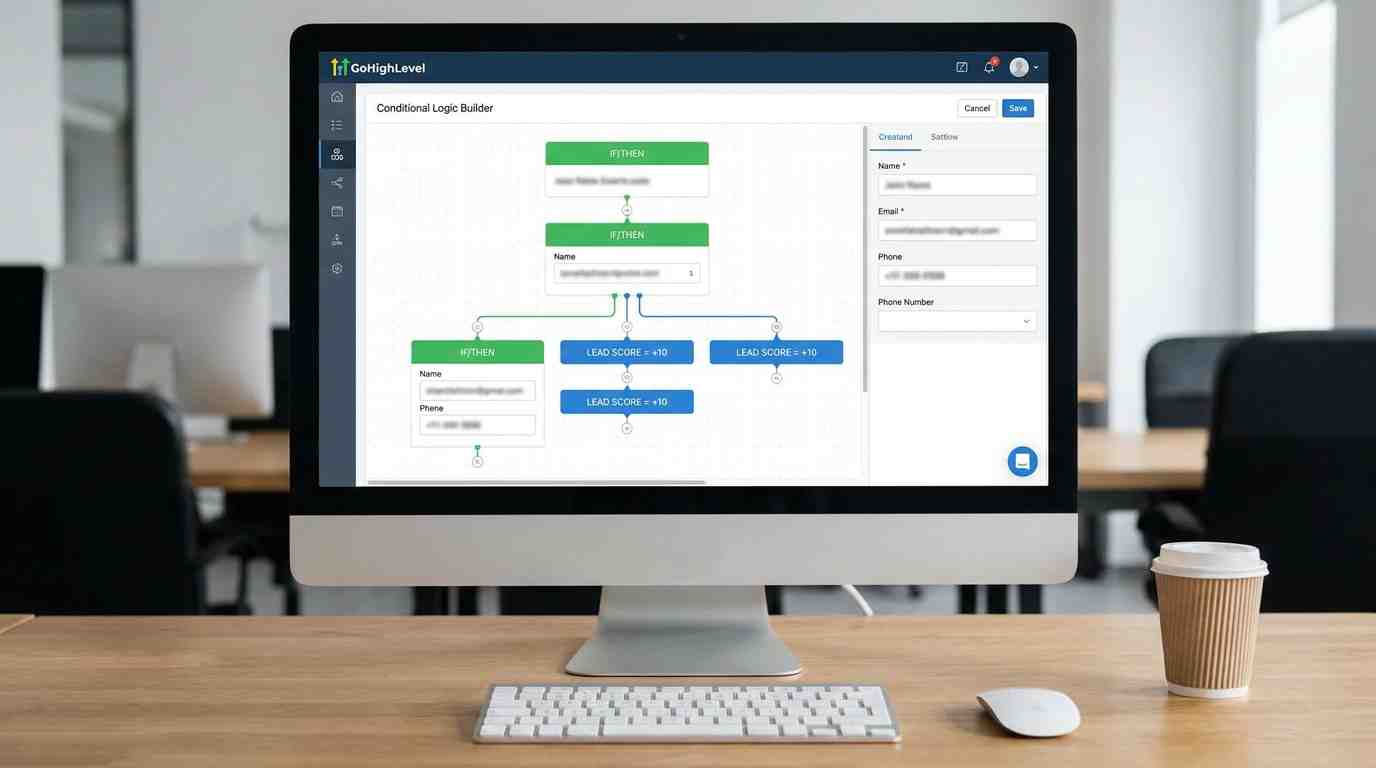
GoHighLevel– all‑in‑one CRM with built‑in automations for agencies.
HubSpot– B2B CRM with advanced AI for lead scoring.
Pipedream– developer‑friendly, good for custom code.
Concepts you need to know:
Trigger– the event that starts a workflow (e.g., new email, form submission).
Action– what happens next (e.g., send SMS, add row to Google Sheets).
Conditional logic– if/then branches.
Webhook– a way for apps to talk to each other in real time.
API– the underlying connection layer. When an API changes, your workflow breaks.
Geography-aware examples(to show we understand your markets):
A Melbourne restaurant using SMS automation to reduce no‑shows.
A Texas home services agency routing leads by zip code.
A London SaaS company automating trial user onboarding.
A Toronto real estate team sending automated listing alerts.
We will use these concretely below.
Three Industry‑Specific Automations That Actually Work
Generic advice is useless. Here are three industries with specific, copyable workflows.
Restaurants: The No‑Show Killer
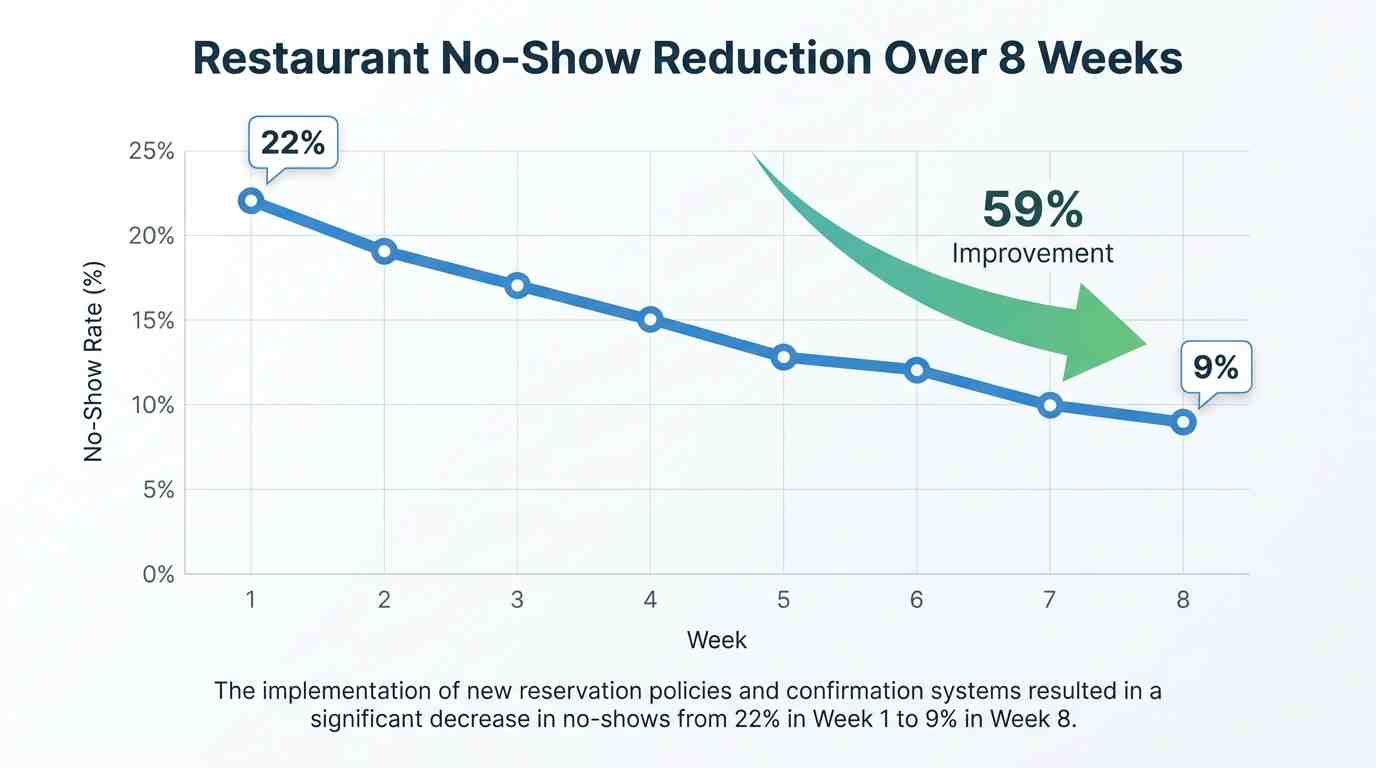
The problem:15–25% of reservations don’t show up. That’s lost revenue.
The automation:
Trigger: Booking made in reservation system (e.g., OpenTable, Resy, or a Google Form).
Action 1: Send confirmation SMS with “Reply YES to confirm.”
Wait 24 hours before booking time.
Action 2: If no confirmation, send reminder SMS.
Action 3: If still no reply 2 hours before, release the table and add guest to “rebook later” list.
A pizzeria in Manchester, UK, cut no‑shows from 22% to 9% in eight weeks. They used Make (free tier). Total cost: zero.
Tools:Make, Zapier, or GoHighLevel’s SMS automation.
Agencies: The Hot Lead Alert
The problem:You get a lead inquiry. Your team sees it four hours later. The lead has already hired someone else.
The automation:
Trigger: New contact in CRM (GoHighLevel or HubSpot) with source = Facebook Lead Ad.
Condition: If lead score > 80 (based on budget and industry).
Action: Send Slack message to #hot-leads channel with name, phone, and link to contact record.
Also: Create a task in Asana or ClickUp with priority “urgent” and due in 15 minutes.
A digital agency in Sydney reduced response time from 3 hours to 4 minutes. They closed 31% more leads in 90 days.
Tools:GoHighLevel (native Slack integration) or Zapier + HubSpot.
E‑commerce: The Abandoned Cart That Converts
The problem:70% of carts are abandoned. Most businesses send one email. That’s not enough.
The automation:
Trigger: Cart abandoned for 1 hour.
Action 1: Send SMS: “Forgot something? Use code SAVE10 for 10% off.”
Wait 4 hours.
Action 2: If no purchase, send email with product images and a testimonial.
Wait 24 hours.
Action 3: If still no purchase, send WhatsApp message (where permitted) with a free shipping offer.
A skincare brand in Vancouver recovered 18% of abandoned carts using this three‑step sequence.
Tools: GoHighLevel (SMS + email + WhatsApp) or Make + Shopify + Twilio.
GoHighLevel vs HubSpot for AI Workflows (A Decision Framework)
You will see this comparison everywhere. Here is the honest, conditional answer.
Use GoHighLevel if:
You send high‑volume SMS (real estate, home services, fitness coaches).
You need to white‑label the CRM for your own clients.
Your average deal size is under $5,000 and volume is high.
You don’t need advanced revenue attribution.
Use HubSpot if:
Your sales cycle is longer than 30 days (B2B SaaS, consulting).
You need to report on which marketing channel generated which revenue.
Your team is larger than 10 people and needs role‑based permissions.
You have budget for $800+/month.
The nuance: Both can do AI workflow automation. But GoHighLevel’s AI is basic lead scoring. HubSpot’s AI can predict which leads are most likely to close based on historical data. That’s a real difference.
A Chicago B2B agency switched from GoHighLevel to HubSpot and saw a 27% increase in forecast accuracy. A Denver roofing company did the opposite and cut software costs by 70%. Know your use case.
The Real Costs of AI Workflow Automation (Beyond the Monthly Fee)
Everyone lists the subscription price. No one lists the hidden costs. Here they are.
Setup time. A simple two‑step workflow (form → email) takes 10 minutes. A workflow with branches, delays, and webhooks takes 2–4 hours. That’s billable time or employee hours.
Maintenance. APIs change. GoHighLevel pushed 12 breaking changes in 2025. Each one required manual fixes. If you have 20 workflows, that’s a day of work every quarter.
Debugging. When a workflow fails, you don’t always know. Leads go into a black hole. A Florida real estate agent lost 47 leads over three weeks because a single “wait” step was set to 999 days instead of 9. No one noticed.
Training. Your team needs to understand what the automation does and does not do. Otherwise, they will override it or ignore alerts. That training takes time and costs money.
Opportunity cost of over‑automation. We have seen businesses spend 40 hours building a workflow that saves 2 hours a month. That’s a 20‑month payback. Not worth it.
Do the math before you start. Automate only tasks that take more than 5 hours per month and are highly repetitive.
When AI Workflow Automation Fails (And What to Do Instead)
The most popular advice is “automate everything.” That fails for three specific types of businesses.
Type 1: High‑touch, high‑value services.
If each client is worth $50,000+ and requires a personal relationship, aggressive automation feels cold. Automate only scheduling and reminders. Do everything else manually. A management consultancy in Boston tried to automate their proposal follow‑up. Clients complained it felt robotic. They turned it off.
Type 2: One‑person operations.
Automation still helps, but you don’t need enterprise tools. Stick with free tiers. Start with one workflow. Add a second only after the first runs smoothly for a month. A freelance designer in Brisbane automated her invoicing. That saved 2 hours a month. Good enough.
Type 3: Regulated industries (healthcare, finance, legal).
AI decisions about patient or client data can violate GDPR, HIPAA, or SEC rules. Never automate actions that require human judgment. Automate only administrative tasks like appointment reminders or document routing. A financial advisory firm in Texas automated their client onboarding documents. Then an AI sent a sensitive tax form to the wrong email address. They lost a client.
The fix: Start small. Test with low‑risk tasks. Scale only when you trust the system.
Your 5‑Point AI Workflow Audit (Do This Before Buying Anything)
Before you spend a dollar, audit your current operations. Answer these five questions.
Which single task do I or my team repeat more than 10 times a week?
That’s your first automation candidate.Where do leads or customers get stuck for more than 24 hours without a response?
That’s a leak in your funnel.Which notification do I ignore because it comes too often?
That’s noise, not signal. Fix the trigger.Which manual data entry step causes the most errors?
That’s where automation pays off fastest.If I could automate only one thing, what would save me three hours a week?
That’s your ROI anchor.
Write the answers down. Then build that single workflow. Nothing else.
So, Should You Invest in AI Workflow Automation?
Yes – if you start with one high‑pain problem and measure the time saved.
No – if you try to automate your entire business in a weekend.
The businesses that win in 2026 are not the ones with the most automations. They are the ones with the right automations. One correctly built lead routing workflow beats ten broken sequences.
Check current pricing on Zapier, Make, GoHighLevel, and HubSpot directly. Each platform updates its plans regularly.
Your next move is not buying software. It’s picking one workflow from this article – the restaurant no‑show killer, the agency hot lead alert, or the e‑commerce abandoned cart – and building it this week. Test it with five real leads. Then expand.
That’s how automation actually works. One step at a time.
FAQ
1. What is AI workflow automation for businesses in plain English?
It’s software that does repetitive tasks for you – like sending an SMS when someone fills a form or routing a lead to the right salesperson. The “AI” part is mostly if/then rules.
2. How is it different from regular automation?
Regular automation follows exact rules. AI automation can learn from past data – for example, which email subject line got more opens. But most small business “AI” is just rule‑based.
3. Which tool is best for a restaurant?
Make or Zapier – both connect to reservation systems. GoHighLevel also works if you use its SMS features. Start with free plans.
4. Can I automate my entire agency with GoHighLevel?
Yes, for lead routing, SMS follow‑ups, and reporting. But for advanced lead scoring, HubSpot is stronger. Choose based on your deal size and volume.
5. How much does AI workflow automation cost?
Free for basic workflows (Zapier free tier: 100 tasks/month). Paid plans start at20/month.Enterprisetoolscost20/month.Enterprisetoolscost800+/month. Always verify current pricing.
6. What breaks most often in workflows?
API changes. When GoHighLevel or HubSpot update, webhooks can fail. Also, bad conditional logic – like “if tag = X AND tag = Y” when one tag is missing.
7. How do I know if my workflow is broken?
Check your tool’s “activity log” or “history.” Look for failed steps or leads stuck in a stage for more than 7 days. Run a monthly audit.
8. Can AI workflow automation replace my employees?
No. It replaces repetitive tasks. Your employees then do higher‑value work. Anyone promising “replace your team” is selling something unrealistic.
9. What’s the biggest mistake beginners make?
Automating too much at once. Start with one workflow. Test for two weeks. Then add another. Patience beats speed.
10. Where can I get help building these workflows?
You can hire a specialist. Look for “workflow automation services” or check platforms like Fiverr or Upwork. Or use the documentation of Zapier, Make, or GoHighLevel.