HighLevel Meeting Rooms: The Complete Setup Guide (and Can They Replace Zoom?)
If your agency lives in GoHighLevel, your client calls probably live somewhere else. A Zoom link in the calendar invite, a Google Meet link in the confirmation email, a recording that ends up in a different app from the notes. HighLevel Meeting Rooms, announced at LevelUp 2026, is HighLevel's attempt to end that split: video calls built into the platform, with the recording, transcript and AI summary landing in the same place as the contact record.
HighLevel Meeting Room is GoHighLevel's built-in video conferencing tool, announced at LevelUp 2026. It gives every sub-account a permanent personal room link, instant meetings, recordings, speaker-labelled transcripts and AI summaries — but only agencies on the $497 Founder Plan can use it. For those agencies it can replace Zoom for most client calls; everyone else still needs an external tool.
This guide covers what Meeting Room does, who can use it, how to set it up step by step, how it connects to calendars, and the honest answer on whether it replaces Zoom.
What is HighLevel Meeting Room?
HighLevel Meeting Room is the video conferencing tool built into GoHighLevel, so agencies can host client calls, team meetings and training sessions without a separate platform such as Zoom or Google Meet. It lives inside each sub-account and has three areas: My room, where you create and manage your personal room with a permanent, reusable link; Team rooms, where you find and join your team members' rooms; and Integrations, where Meeting Room connects to other HighLevel products.
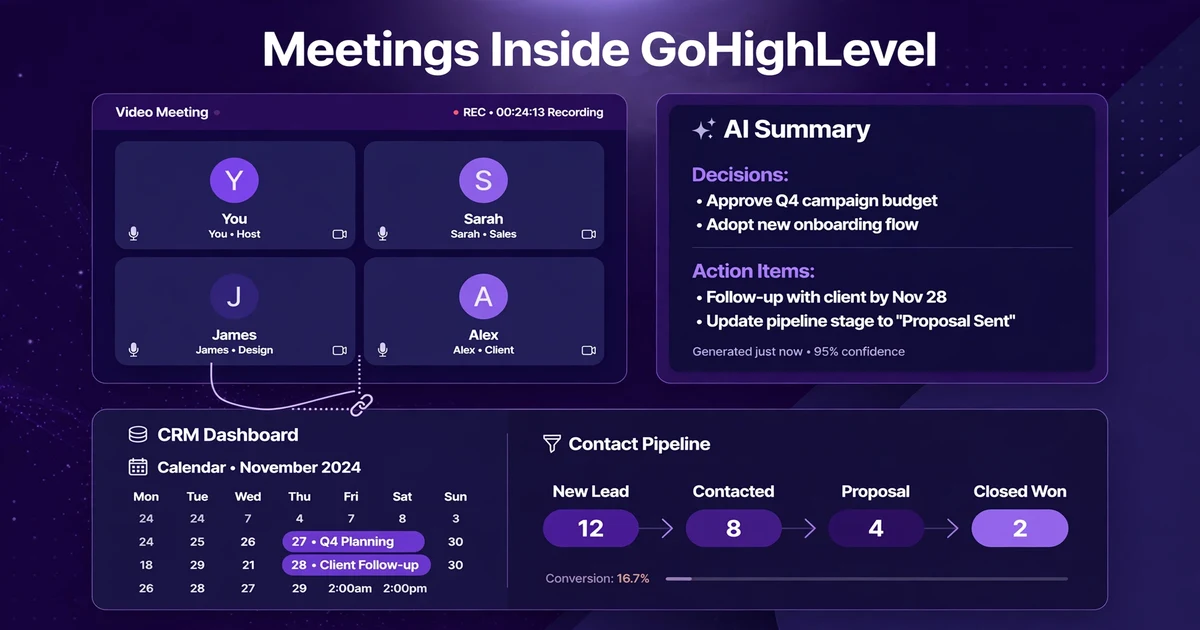
The idea is simple. The meeting link, the recording, the transcript and the summary all sit inside the system that already holds the contact, the pipeline and the calendar. A sales call ends, and the AI summary — key decisions, action items, who said what — is available in the same sub-account as the opportunity it relates to. No exporting a recording from one tool and uploading it to another.
Meeting Room arrived as part of the LevelUp 2026 release wave in late October 2026, and HighLevel lists it in its official changelog under "Introducing Meeting Room". It is still in Labs beta, which means it is rolling out and some details — including participant limits and recording storage limits — have not been published yet. This article states what is confirmed and flags what is not, rather than guessing.
Who can use Meeting Room?
Meeting Room is available only to agencies subscribed to HighLevel's Founder Plan, which costs $497 a month. It is not available on the $97 Starter plan or the $297 Unlimited plan. That restriction comes from HighLevel's own help article, stated plainly: the feature is exclusive to Founder Plan agencies.
That matters for the "can it replace Zoom" question, because the answer depends entirely on your plan. If you are on the Founder Plan, Meeting Room is already included in what you pay — there is no separate per-user video licence to buy. If you are on Starter or Unlimited, Meeting Room is not an option at all, and the comparison below does not apply to you. Our GoHighLevel pricing guide explains what each plan includes, so you can work out whether the Founder Plan's other features justify the step up.
One practical note: because Meeting Room is a Labs beta, it may need to be switched on for your agency before it appears. If you do not see Meeting Room in a sub-account, check Labs in your agency settings first — and test it on an internal call before you use it with a paying client.
What can you do with Meeting Room?
Meeting Room covers the core of a video call — instant meetings, screen sharing, chat, waiting rooms, recordings, transcripts and AI summaries — inside HighLevel, with guests able to join from a link without a HighLevel account. The full feature set, as documented in HighLevel's help article, breaks down into four groups.
Video meetings and collaboration
- Instant meetings: start a video call at any time without scheduling an appointment first.
- Guest access: invite participants with a link; they do not need a HighLevel account when guest access is enabled.
- Screen sharing and live chat: present content and message participants during the call.
- Interactive tools: reactions, hand raising and different meeting layouts, plus picture-in-picture on Chrome desktop so you can keep the shared screen visible while switching tabs.
- Custom backgrounds: upload your own background when signed in, so client calls look branded rather than improvised.
Meeting management and security
- Host and co-host controls: manage participants, permissions and who runs the meeting.
- Waiting rooms and passcodes: control who gets in, so a shared link does not become an open door.
- Video and audio settings: configure cameras, microphones, backgrounds, lighting and noise cancellation, with a system-default audio option that switches to a connected headset automatically.
- Adaptive background effects: Meeting Room reduces background blur and effects automatically if device performance drops, to keep the call smooth.
Recordings, transcripts and AI
- Meeting recordings: record the call and revisit it afterwards from Meeting History.
- Speaker-labelled transcripts: review the conversation with speaker names and timestamps.
- AI meeting assistance: ask questions during the meeting and generate summaries, key decisions and action items from the transcript.
- Multilingual live transcription: transcription runs on Deepgram Nova-3, with nine individual language options and a Mixed Languages mode that detects the language automatically, including when participants switch languages mid-conversation. Mixed Languages supports ten languages, including Dutch, Hindi, Russian and Japanese.
Integrations with the rest of HighLevel
Meeting Room connects to five HighLevel products: Calendars, Communities, Courses, Events and Webinars. The calendar connection is the one most agencies will use daily — set Meeting Room as the meeting location on a calendar and each appointment gets either your permanent room link or a unique link generated for that appointment. It can also host live discussions and Community Events, add live sessions to courses, serve as the online location for an event, and connect live webinars to a room.
Managed Agents can also retrieve Meeting Room information — room details, upcoming and past meetings, recordings, transcripts and AI summaries — through the default plugin when Meeting Rooms (Labs beta) is enabled, and Ask AI can answer natural-language questions about meetings. Agents cannot rename or delete rooms, control live meetings or regenerate summaries, and access follows existing Memberships permissions.
How do you set up your personal Meeting Room?
Setting up a personal Meeting Room takes six steps: open Meeting Room in your sub-account, create the room, name it and choose its permanent link, set your security options, add co-hosts if you need them, and save. The permanent link is the point — one URL you can put in your email signature, your booking pages and your proposals, and reuse for every call.
- Open your HighLevel sub-account and go to Meeting Room, then My room.
- Click Create room.
- Under Room details, enter your Name and your Room link. Choose a link you are happy to share publicly, because this is the URL clients will see.
- Under Security, configure your passcode, waiting room, guest access and room availability. Turn the waiting room on if the link will be shared widely; a passcode adds a second layer for sensitive calls.
- Optionally, add a co-host under Co-hosts so a team member can run the room when you cannot.
- Click Save changes. Your personal Meeting Room is ready to use.
Two settings deserve a decision rather than a default. First, guest access: leave it on if clients join from the link, but pair it with the waiting room so nobody walks into a live call unannounced. Second, room availability: set it to match your working hours, so the room does not look open when you are not there.
How do you start an instant meeting?
An instant meeting starts in four clicks: open My room, click Start room, check your camera and microphone, and click Start now. No scheduling, no invite, no link to generate — useful for the "can you jump on a quick call?" moments that currently mean opening Zoom and pasting a link into chat.
- Go to Meeting Room, then My room.
- Click Start room.
- Review your microphone, speaker and camera settings.
- Click Start now to begin the meeting.
To invite participants, copy your Room link from My room and share it with them. Guests join from the link in their browser; they do not need a HighLevel account or an app install when guest access is enabled.
How does Meeting Room work with calendars?
Set Meeting Room as the meeting location on a calendar, and every new booking gets a meeting link automatically — either your permanent room link or a unique link generated for that appointment. That is the workflow that makes Meeting Room more than a standalone video tool: the booking, the confirmation, the reminder and the call itself all run through the same system.
In each calendar's settings, choose Meeting Room as the meeting location. The permanent link suits recurring calls with the same client — a weekly check-in, a coaching series — where one unchanging URL is a feature, not a risk. The unique link per appointment suits one-off sales calls and discovery calls, where a fresh link per booking is cleaner and easier to control.
The practical gain is in the follow-up. A prospect books a call, the confirmation carries the Meeting Room link, the call happens, and the recording and AI summary sit in the sub-account next to the contact and the opportunity. The next person who opens that contact can see what was agreed without asking anyone. That is the difference between a video tool and a video tool inside your CRM.
What do the recordings, transcripts and AI summaries actually do?
Meeting Room records the call, transcribes it with speaker names and timestamps, and generates an AI summary of key decisions and action items — but the transcript only exists if you turn transcription on during the meeting. This is the one detail that catches people out, and HighLevel states it explicitly: recording a meeting does not automatically generate a transcript. Transcription must be enabled during the meeting for the transcript and the AI features to work.
In practice that means one habit change: when a call starts, start transcription as well as recording. If you record without transcribing, you get a video file and no summary. If you transcribe, you get the speaker-labelled transcript, the AI summary, and the ability to ask questions about the meeting afterwards through Ask AI.
The summaries are the part with the most day-to-day value for an agency. A client call produces decisions and action items; the AI summary pulls them out so the project manager does not have to rewatch an hour of video. Combined with the calendar integration, a sales call can go from booking to summarised notes without anyone opening a second app. Our guide to AI agents in lead qualification covers the same pattern — AI doing the note-taking so humans do the selling.
Can Meeting Room replace Zoom?
For a Founder Plan agency, Meeting Room can replace Zoom for most client calls — sales calls, onboarding, coaching and team meetings — because the calls, recordings and summaries live inside the CRM. It cannot replace Zoom for large webinars or for anyone not on the Founder Plan. The honest comparison is about what each tool is for, not which one has more features.
| Factor | HighLevel Meeting Room | Zoom Workplace Pro | Verdict |
|---|---|---|---|
| Cost for a Founder Plan agency | Included in the $497/mo Founder Plan | $16.99 per user per month billed monthly, $14.16 billed annually (November 2026) | Meeting Room wins on cost if you already pay for the Founder Plan |
| Cost for Starter / Unlimited agencies | Not available | $16.99 per user per month billed monthly | Zoom wins — Meeting Room is not an option |
| Meeting links | Permanent personal link, or a unique link per calendar appointment | Personal Meeting ID or a new link per meeting | Tie — both offer a reusable link |
| Recordings | Yes, stored in Meeting History | Yes, 10 GB cloud recording per licence on Pro | Zoom wins on published storage; Meeting Room storage limits not published |
| Transcripts and AI summaries | Speaker-labelled transcripts, AI summaries with decisions and action items, Ask AI | AI Companion summaries included on paid plans | Tie — both summarise; Meeting Room keeps the summary inside the CRM |
| Participants | Not published by HighLevel as of 25 November 2026 | 100 participants on Pro; meetings up to 30 hours | Zoom wins — published limits beat unpublished ones |
| Integrations | Calendars, Communities, Courses, Events, Webinars, Managed Agents | Hundreds of third-party apps | Zoom wins on breadth; Meeting Room wins on depth inside GoHighLevel |
| Guest experience | Join from a link in the browser, no account needed | Join from a link, no account needed for guests | Tie |
| Maturity | Labs beta, announced at LevelUp 2026 | Established platform, years of refinement | Zoom wins on maturity |
The verdict is that Meeting Room replaces Zoom when the call belongs inside GoHighLevel, and does not when the call belongs outside it. A sales call booked on a HighLevel calendar, with the prospect's contact record in the same sub-account, is a Meeting Room call: the summary lands where the follow-up happens. A 200-person webinar, a call with a client who insists on Zoom, or a team that is not on the Founder Plan stays on Zoom. Most Founder Plan agencies will end up using both — Meeting Room as the default, Zoom as the fallback — and saving the Zoom licences they no longer need for everyday calls.
Start your 14-day free trial of GoHighLevel here (affiliate link) — if you are not on GoHighLevel yet, that is the way to test Meeting Room's parent platform, and the Founder Plan is the tier that unlocks it.
If the real question is not which video tool to use but who will build and run the system around it — the calendars, the follow-up workflows, the AI summaries feeding your pipeline — that is what CRM Automates does. We are a GoHighLevel certified company trusted by 300+ businesses, with 150+ team members and 24/7 live expert support. See how a dedicated team runs your GoHighLevel or book a call to talk through your setup.
What Meeting Room cannot do yet
Meeting Room is a new Labs beta, so the honest limits are the ones HighLevel has not published yet — and a few that come with being built into a CRM rather than built as a video platform. Naming them plainly is better than discovering them on a client call.
- Participant and storage limits are unpublished. HighLevel has not published a maximum participant count or a recording storage limit for Meeting Room as of 25 November 2026. If you run large group calls, test the limit on an internal meeting first rather than finding it live with a client.
- It is Founder Plan only. The $97 and $297 plans do not get it, and there is no add-on price published for buying it separately. Agencies on lower plans must either upgrade or keep their current video tool.
- Transcription is not automatic. Recording alone produces no transcript and no AI summary; transcription has to be switched on during the meeting. Build it into your call routine or the feature silently does nothing.
- Picture-in-picture is Chrome-only on desktop. The enhanced picture-in-picture view and the system-default microphone and speaker options are available in Chrome. Other browsers get the standard experience.
- It is young. Meeting Room was announced at LevelUp 2026 and is in Labs beta. Zoom has years of edge-case handling — breakout rooms at scale, dial-in numbers, webinar registration — that Meeting Room has not had time to build. Expect rough edges and occasional changes while it matures.
None of these is a reason to ignore it. They are reasons to adopt it deliberately: start with internal meetings, then recurring client calls, then sales calls — and keep Zoom as the fallback until you trust it.
Who should switch, and who should wait?
Switch now if you are on the Founder Plan and your calls already start from a HighLevel calendar; wait if you are on a lower plan, run large webinars, or need published participant and storage limits before you commit. A simple test: if most of your calls are one-to-one or small-group client calls booked through GoHighLevel, Meeting Room will save you a subscription and a step. If most of your calls are large training sessions, public webinars or calls with clients who dictate the platform, keep what works and revisit Meeting Room in a few months.
For agencies already on the Founder Plan, the cost argument is the easiest one in this article. You are paying $497 a month whether you use Meeting Room or not. Every client call you move from Zoom to Meeting Room is a call whose recording and summary lands in your CRM for free — and every Zoom licence you drop is $16.99 a month back. Our LevelUp 2026 roundup covers the other Founder Plan features the same maths applies to, including task management and ticketing.
For agencies on Starter or Unlimited, the question is different: is the Founder Plan worth $497 a month for Meeting Room plus everything else it unlocks? Meeting Room alone probably does not justify the jump from $297 to $497. Meeting Room plus the full Founder Plan feature set might — but that is a pricing decision, not a video decision, and it deserves its own calculation.
Bottom line
HighLevel Meeting Rooms is the most useful boring feature from LevelUp 2026. It does not demo well on a stage — it is a video call inside the tool you already open every morning. Its value is in the boring parts: one link instead of three, a recording that lands next to the contact instead of in a separate app, a summary that writes itself while you sell. For Founder Plan agencies, that is worth switching for. For everyone else, it is a reason to watch the Founder Plan, not a reason to buy Zoom's replacement today.
Try GoHighLevel free for 14 days and test Meeting Room on your next client call. Start your 14-day free trial here (affiliate link). And if you want the calendars, workflows and follow-up built around it by people who run GoHighLevel every day, see what a dedicated team from CRM Automates can do — a GoHighLevel certified company trusted by 300+ businesses, with 150+ team members and 24/7 live expert support. Or book a call and we will talk through your setup.
FAQ
What is HighLevel Meeting Room?
HighLevel Meeting Room is GoHighLevel's built-in video conferencing tool, announced at LevelUp 2026. It lets agencies host video calls directly inside HighLevel — with a permanent personal room link, instant meetings, screen sharing, waiting rooms, recordings, speaker-labelled transcripts and AI summaries — without a separate platform such as Zoom or Google Meet. It also connects to Calendars, Communities, Courses, Events and Webinars.
How do I set up a Meeting Room in HighLevel?
Open your HighLevel sub-account, go to Meeting Room, then My room, and click Create room. Enter a name and a permanent room link under Room details, set your passcode, waiting room, guest access and room availability under Security, add a co-host if needed, and click Save changes. Then choose Meeting Room as the meeting location in your calendar settings so bookings get a link automatically.
Is HighLevel Meeting Room free?
Meeting Room is included in HighLevel's Founder Plan, which costs $497 a month, according to HighLevel's own help article. It is not available on the $97 Starter plan or the $297 Unlimited plan, and no separate add-on price has been published. If you are already on the Founder Plan, there is no extra charge; if you are on a lower plan, you would need to upgrade to use it.
Can HighLevel Meeting Rooms replace Zoom?
For a Founder Plan agency, yes for most client calls — sales calls, onboarding, coaching and team meetings — because the calls, recordings and AI summaries live inside the CRM, and the feature is already included in the plan. It cannot replace Zoom for large webinars, for agencies not on the Founder Plan, or where published participant and storage limits matter, because HighLevel has not published those limits yet.
Do guests need a HighLevel account to join a Meeting Room?
No. Guests can join from the meeting link in their browser without a HighLevel account when guest access is enabled on the room. You can also protect the room with a waiting room and a passcode, so a shared link does not let uninvited people straight into a live call.
Why is there no transcript or AI summary for my recorded meeting?
Recording a meeting does not automatically generate a transcript. Transcription must be switched on during the meeting for the transcript and the AI summary to be created — HighLevel states this explicitly in its help article. If you recorded without enabling transcription, you will have the video file but no transcript, no summary and no Ask AI answers. Start transcription as well as recording at the beginning of every call you want summarised.