GoHighLevel Appointment Booking Automation: 2026 No‑Fail Setup
You added a booking link to your site. Prospects still DM you for times. Three reminders fired this week; two never went out. Your round‑robin calendar keeps handing every lead to the same rep while the other four sit idle. That’s not automation. That’s a digital to‑do list dressed up as a system.
A real GoHighLevel appointment booking automation does three things. It lets clients self‑schedule without back‑and‑forth. It sends reminders that actually land. And it recovers the people who forget to show up—without you touching anything.
This guide walks through the exact setup that makes that happen in 2026. No generic feature tours. Just the configuration choices, reminder logic, and recovery sequences that separate a calendar that works from one you have to babysit.
What GoHighLevel Appointment Booking Automation Actually Does
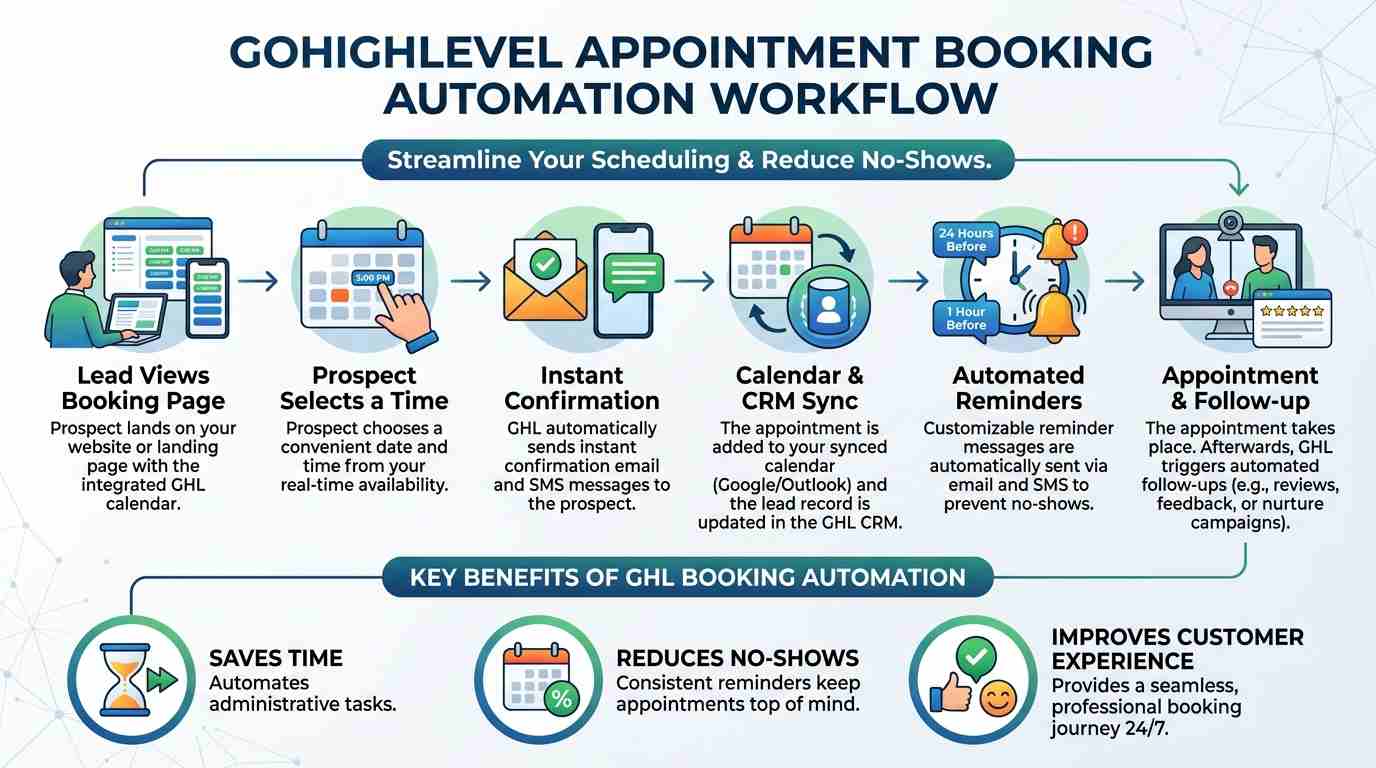
GoHighLevel appointment booking automation connects a self‑service calendar to automated follow‑up sequences. A client picks a time, fills out a short form, and the system confirms the slot, sends reminders at the right intervals, notifies the correct team member, and triggers post‑meeting actions—all without a human clicking “send.”
The calendar is the entry point. The automation is what moves the relationship forward. Confirmation emails and texts fire instantly. Reminders go out 24 hours and 1 hour before the meeting. If someone no‑shows, a recovery sequence kicks in, offering a reschedule link and pausing further outreach once they reply. After the meeting, a thank‑you message, a review request, and a next‑step follow‑up fire in sequence.
This is not a single toggle you flip. It’s a layered build. But once it’s in place, your calendar stops being a scheduling tool and starts being a silent sales assistant.
Choosing the Right Calendar Type for Your Business
GoHighLevel offers several calendar types, and picking the wrong one creates immediate scheduling chaos. The four you’ll actually use are:
Personal Bookingattaches to one team member. Use it for solo coaches, consultants, or anyone who books their own appointments. It’s the simplest to configure and the hardest to break.
Round Robindistributes bookings across a team, checking availability over a rolling month when set to Any Available. Sales teams, support queues, and intake calls rely on this.
Collective Bookingpulls several team members onto the same meeting. Demos, panels, and account reviews use this.
Service Calendar, released in early 2026, handles complex multi‑resource bookings directly from the mobile app—think a fitness studio where clients book a trainer, a room, and equipment in one flow.
Don’t overcomplicate this on day one. If you’re a solo operator, set up a Personal Booking calendar, confirm it works end‑to‑end, then build your reminders. If you’re a team, Round Robin is almost always the right starting point.
Building Reminders That Actually Fire
The GoHighLevel calendar includes a quick, built‑in reminder toggle. It sends an email and SMS at preset intervals. That works for basic use. It stops working when you need conditional logic—different messages for different appointment types, or a voicemail drop 15 minutes before a high‑stakes call.
For that, you build reminders inside Workflows. The trigger is Customer Booked Appointment. This fires once, when a brand‑new booking is created by the customer, not when you move things around internally.
The workflow sequence looks like this:
Send confirmation email with meeting details immediately.
Wait until 24 hours before the appointment time and send an SMS reminder.
Wait until 1 hour before and send a final SMS.
After the appointment time passes, send a thank‑you message and a review request.
The timing logic trips people up. Workflow Wait steps count from the moment the workflow activates, not from the appointment time. So you calculate the delay: if the booking is made 5 days out, and you want a reminder 24 hours before, the Wait step needs to pause for 4 days. The appointment date and time are custom values you can pull directly into the builder.
Set this up once. Test it with your own booking link. Fix the timing. Then duplicate the workflow for every calendar type you use.
Recovering No‑Shows Automatically
For service businesses, a no‑show isn’t just an empty slot. It’s direct revenue loss. The good news: most no‑shows happen because people forget, not because they’ve lost interest.
A proper recovery sequence catches them. When an appointment status switches to No‑Show, a workflow triggers:
An immediate SMS: “We missed you. Reply BOOK to reschedule.”
If the contact replies, the workflow stops further outreach and routes them to a reschedule link.
If they don’t reply within 24 hours, an email goes out with the same offer.
If still nothing after 72 hours, the contact is tagged for manual follow‑up by your team.
This one sequence routinely recovers 15 to 25 percent of no‑show appointments for our clients. It runs silently in the background. You notice the improvement in your bank balance, not your notification feed.
When the Native Calendar Isn’t the Answer
Most tutorials treat the native GoHighLevel calendar as the only option. It’s not. There are three clear situations where using an external calendar or a hybrid setup is the smarter call.
Complex multi‑host routing:Round Robin distributes evenly, but it doesn’t do weighted distribution or skill‑based routing. If a specific rep should handle a specific type of call based on expertise, the native calendar doesn’t support that without custom development.
Existing Calendly investment:If your business runs on Calendly with dozens of active event types, deep team habits, and third‑party integrations, migrating to the native calendar overnight causes more disruption than consolidation is worth. In this case, keep Calendly as the booking front‑end and trigger GoHighLevel workflows when a Calendly booking creates a contact.
Overlapping availability for one user across multiple calendars: GoHighLevel does not allow a single user to have overlapping bookable slots across two different calendars. Fitness studios, coaching practices, or consultancies where one practitioner offers distinct services tied to separate calendars hit this wall. The workaround is consolidating services into one calendar or using an external scheduler for the overlap.
The goal is reliable bookings, not ideological platform loyalty. Pick the tool that handles your actual scheduling complexity, then connect everything else through automation.
What Changes at Different Scales
A solo operator sets up a Personal Booking calendar in an afternoon. Confirmations, reminders, and thank‑you messages can be configured over a weekend. The complexity lives in the follow‑up, not the booking itself.
A small team of five to ten sales reps needs Round Robin with clear distribution rules, conflict detection across team members’ external calendars, and internal notification workflows that ping the right person instantly.
A multi‑location business with practitioners across offices needs multiple calendars grouped by location and service type, plus AI‑powered routing that understands intent and directs booking requests to the correct calendar. At this scale, the implementation is less about calendar settings and more about the workflow architecture that holds everything together.
For businesses in that middle and upper tier, the “build‑in‑house or hire a specialist” decision becomes real. A multi‑location practice that needs AI routing, multi‑calendar conflict management, and automated no‑show recovery typically gets to a working system months faster with a professional implementation.CRM Automatesengineers these exact systems for service businesses across the US, UK, and Canada, building the backend infrastructure so booking, reminders, and recovery run without daily oversight.
Five Common Setup Mistakes That Break Automations
Using the wrong calendar type for the team structure.A solo operator using Round Robin wastes configuration effort. A five‑person sales team using Personal Booking guarantees scheduling chaos.
Relying only on built‑in reminders.They’re rigid. As soon as you need different messages for different appointment types, you need Workflows.
Misconfiguring Wait step timing.Reminders that fire at the wrong time—or never—are almost always a Wait step calculation error.
Ignoring calendar sync.If team members’ Google or Outlook calendars aren’t connected, GoHighLevel books them during existing commitments. Conflict Calendars must be set up per user.
No no‑show recovery sequence.Without one, you’re leaving 15 to 25 percent of booked meetings on the table. Build the recovery workflow before you need it.
GoHighLevel appointment booking automation isn’t a feature you activate. It’s a system you build in layers: the right calendar type, accurate reminder timing, a recovery workflow that chases no‑shows, and regular audits to catch what’s broken before clients notice.
Start with one calendar. Set up Workflows for reminders, not just the built‑in toggles. Add a no‑show recovery sequence. Test everything with your own booking link. Once it runs silently for a week, expand to the next calendar. If the build feels like it’s consuming more time than it saves, bring in a team that does this daily.CRM Automatesdelivers a fully configured booking engine so you spend your time on the meetings themselves, not the machinery that schedules them.
FAQ Section
What is GoHighLevel appointment booking automation?
It’s a system that lets clients self‑schedule through a calendar while automated workflows handle confirmations, reminders, team notifications, and post‑meeting follow‑ups without manual effort.
How do I set up appointment reminders in GoHighLevel?
Use Workflows with the Customer Booked Appointment trigger. Build a sequence with Wait steps timed to fire 24 hours and 1 hour before the meeting. Avoid relying only on the built‑in reminder toggle if you need conditional messaging.
Can GoHighLevel route bookings to the right team member?
Yes. Round Robin distributes bookings evenly across a team. For smarter routing based on intent, Conversation AI supports multiple calendars and can direct booking requests to the correct one from a chat interaction.
Why are my GoHighLevel reminders not firing?
Almost always a Wait step timing error. Wait steps count from the moment the workflow activates, not the appointment time. Recalculate the delay so the reminder hits exactly 24 hours or 1 hour before the scheduled slot.
How do I recover no‑show appointments automatically?
Build a workflow triggered by the No‑Show status. Send an immediate SMS with a reschedule link, follow up with an email after 24 hours, and tag the contact for manual outreach if there’s no reply after 72 hours.
Should I use GoHighLevel’s calendar or keep Calendly?
If you already have deeply embedded Calendly workflows and team habits, keep Calendly as the front‑end and trigger GoHighLevel automations when contacts are created. If you’re starting fresh, the native calendar reduces tool sprawl and sync complexity.
What calendar types does GoHighLevel offer?
Personal Booking for solo users, Round Robin for team distribution, Collective Booking for multi‑host meetings, and Service Calendar for complex multi‑resource bookings, released in 2026.
How do I connect Google Calendar to GoHighLevel?
Go to Settings, Calendars, Connections. Add Google as a provider, authenticate, and set the sync to Conflict Calendar so external events block your GoHighLevel availability. Two‑Way Sync is available as an advanced option.
What’s the biggest mistake people make with GoHighLevel booking?
Building a booking page without automation behind it. A calendar link alone doesn’t confirm, remind, follow up, or recover no‑shows. The automation is what turns a booking into a completed appointment and eventual revenue.
When should I hire someone to set up GoHighLevel booking automation?
If you run a multi‑location practice with complex routing, AI‑powered intent detection, and overlapping team calendars, professional implementation can deliver a working system in weeks rather than months. CRM Automates specializes in these builds for businesses across the US, UK, and Canada.