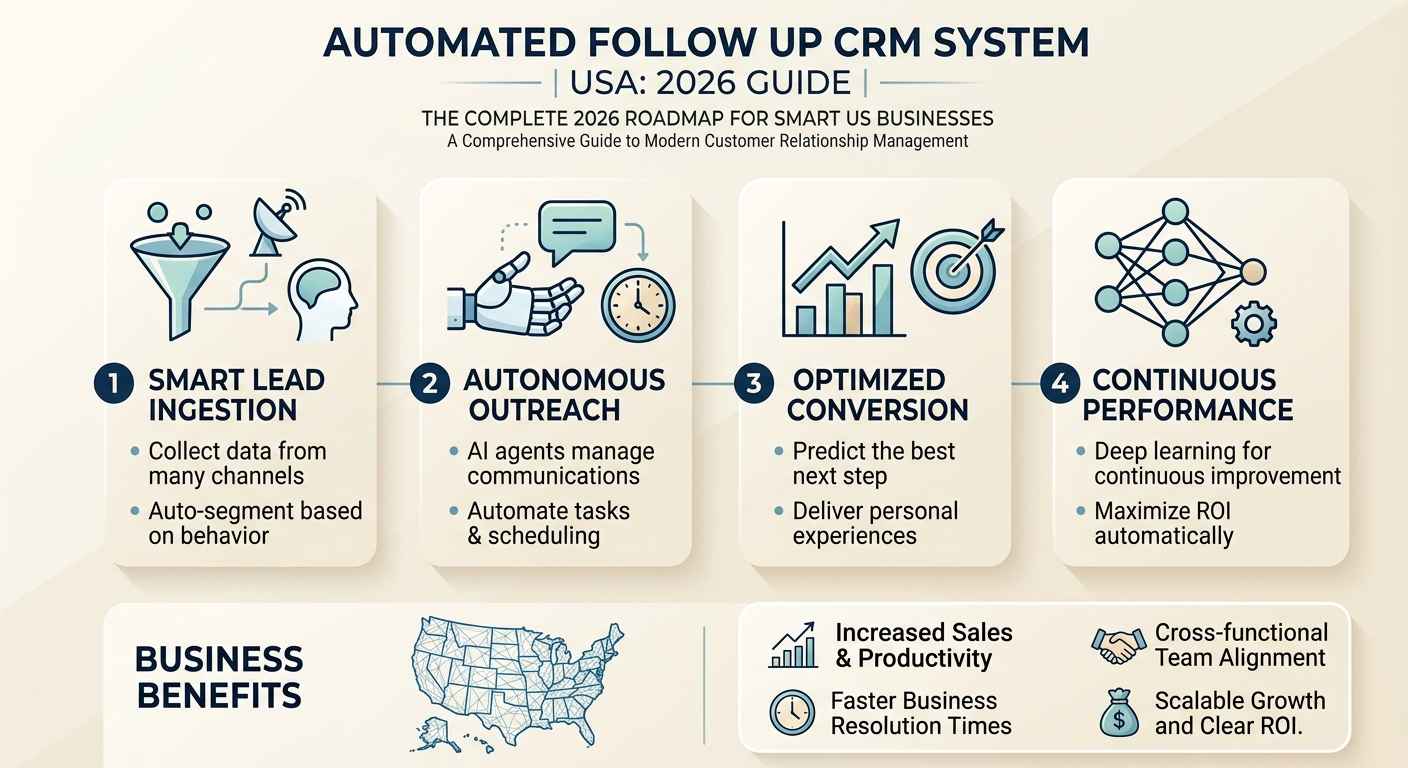
Automated Follow Up CRM System USA: 2026 Guide
You get a new lead. They fill out your form, answer your ad, or call your office. Then life happens — for both of you. Your team gets busy, the lead cools down, and three days later a competitor who responded in four minutes gets the sale. That's not a sales problem. That's a follow-up infrastructure problem.
An automated follow up CRM system solves this by making sure no lead goes dark because someone forgot to send a text. In the US market specifically, where buyers expect speed and competition is dense, the gap between a business that automates its follow-up and one that doesn't is measured in monthly revenue — not in productivity scores. This guide breaks down exactly how these systems work, what to build first, and where most setups go wrong.
What Does an Automated Follow Up CRM System Actually Do?
An automated follow up CRM system is software that triggers pre-built communication sequences — emails, SMS messages, voicemail drops, or task assignments — based on lead actions, time delays, or pipeline stage changes, without requiring anyone on your team to manually initiate each touchpoint.
That's the definition. Here's what it means in practice.
When a roofing company in Texas runs Facebook ads, every inbound lead should receive an SMS within two minutes, an email introducing the company within five, and a call task assigned to a rep within fifteen. Most roofing businesses do none of that automatically. Someone has to remember, and people don't always remember. An automated CRM follow-up workflow runs that entire sequence without human input — every time, for every lead, at any hour.
The "CRM" part matters as much as the "automated" part. Contact management without automation is just a list. Automation without a CRM is a messaging tool with no memory. The two work together: the CRM stores lead data, tracks history, and triggers the right automation at the right time based on where the contact sits in the pipeline.
Why US Businesses Specifically Have a Follow-Up Problem Worth Fixing
The Harvard Business Review published research showing that companies responding to leads within one hour are seven times more likely to qualify that lead than those who waited even sixty minutes. The same study found the average US company takes 42 hours to make first contact. That gap is the problem an automated CRM follow-up system is built to close.
Speed matters for a second reason specific to the US market. American consumers comparison-shop aggressively. A homeowner getting a roof replaced is contacting three to five contractors. The one who calls back first has an outsized conversion advantage — not because of price or quality, but because they were there. Automated lead follow-up sequences are essentially a permanent fix to the human instinct to call back when it's convenient.
There's also a volume problem. As businesses scale, manual follow-up breaks down. A team handling ten leads a week can manage contact by memory and sticky notes. A team handling a hundred leads a week cannot. CRM automation doesn't just make follow-up faster — it makes it possible at scale without proportional headcount growth.
The Six Components of a Follow-Up System That Actually Converts
Most articles stop at "use automation." Here's what a functioning automated follow-up CRM system actually contains, and why each piece matters.
1. Trigger Logic That Matches Real Buyer Behavior
The automation sequence starts with a trigger — the event that tells the system to begin. Common triggers include form submissions, inbound calls, pipeline stage changes, missed appointments, or lead source tags. The mistake most businesses make is using only one trigger type: form submission. That leaves every lead who calls directly, clicks a chat widget, or books through a third-party directory outside the automation entirely.
A properly built CRM follow-up system uses multi-source triggers. Every entry point into your pipeline should fire an appropriate sequence. GoHighLevel, which CRM Automates builds on, supports triggers across web forms, phone calls, SMS replies, appointment bookings, and third-party webhook integrations — all in the same automation builder. That matters because leads don't all arrive through the same door.
2. Multi-Channel Sequences, Not Just Email
Email open rates in B2C markets sit around 20 to 35 percent depending on industry, according to Mailchimp's 2025 benchmarks. That means email-only follow-up systems miss the majority of your audience on the first touch. Effective automated CRM follow-up uses at least three channels: SMS, email, and a scheduled call task — with SMS leading because it has roughly 98 percent open rates and most messages are read within three minutes.
The channel mix should also adapt based on response. If a lead responds to the first SMS, the automation should pause the email sequence and route the contact to a live conversation — not continue blasting them with pre-scheduled messages. This conditional logic is what separates a real follow-up system from a broadcast tool.
3. Timing Windows That Respect the Prospect
Sending a follow-up SMS at 11:47 PM is not persistence. It's a complaint waiting to happen and, depending on state, a potential TCPA violation. A properly configured automated follow-up CRM system uses send-time restrictions tied to the lead's timezone and limits outreach to business hours unless the lead has explicitly opted into 24/7 contact.
This is a detail many agencies skip during setup, and it shows up in spam complaints and unsubscribe rates. CRM Automates configures timezone-aware delivery windows as standard practice across all client builds because the alternative creates compliance risk and destroys brand trust.
4. Personalization Beyond Just a First Name
"Hi {{first_name}}, thanks for reaching out" is not personalization. It's mail merge with extra steps. Real CRM automation personalization uses lead source data, service interest, geographic location, and pipeline history to make each message contextually relevant.
An HVAC company in Phoenix running a summer AC tune-up campaign should be sending different follow-up copy than the same company running a heating promotion in November. The CRM stores that context. The automation uses it. When teams build sequences without pulling in conditional field data, the messages feel generic — and generic doesn't convert.
5. Re-Engagement Sequences for Dead Leads
This is the most underbuilt component in most CRM setups, and it's where the most recoverable revenue sits. Leads who went quiet three months ago aren't necessarily lost. They may have delayed their decision, lost their budget temporarily, or simply chosen a competitor who underdelivered.
A re-engagement sequence — often called a "win-back" workflow — triggers on contacts who have been inactive for 30, 60, or 90 days. Done well, these sequences recover a meaningful percentage of leads who never formally said no. In reviews of CRM builds from US service businesses on GoHighLevel, re-engagement workflows routinely surface deals from leads that had been written off entirely — with zero new ad spend to acquire them.
6. Pipeline Stage Automation That Moves Contacts Forward
Follow-up doesn't end at the first conversation. A complete automated CRM system follows a contact through the entire sales process: pre-appointment reminders, post-appointment check-ins, proposal follow-ups, contract delivery confirmations, and onboarding sequences after the sale closes. Each pipeline stage should have its own associated automation logic.
Most businesses automate only the top of the funnel and then go manual from there. That inconsistency shows up in close rates and in how clients experience the sales process. The drop in professionalism between an automated lead response and a manually forgotten proposal follow-up is jarring — and buyers notice.
Where Most Automated Follow-Up Systems Break Down
Building the automation is step one. Maintaining it is where most setups fail.
Workflows break when contact fields change. They send wrong messages when lead sources get mislabeled. They repeat sequences when tags aren't properly applied after a contact responds. These aren't software failures — they're configuration failures, and they happen constantly in CRM systems that were built once and never audited.
If you're running GoHighLevel and your follow-up sequences were set up six months ago by a freelancer, there's a meaningful chance some of them are firing incorrectly right now. The technical debt in unaudited CRM systems is significant. Contacts getting duplicate messages. Leads going into the wrong pipeline. Appointment reminders firing for cancelled bookings. These errors compound over time and they erode exactly the trust that good follow-up is supposed to build.
The practical solution is a scheduled CRM audit — at minimum quarterly for businesses with high lead volume — that checks trigger accuracy, tests sequence delivery, reviews contact tagging logic, and confirms that any software updates haven't disrupted workflow behavior. GoHighLevel releases regular updates to its automation engine, and builds that worked perfectly in early 2025 sometimes need adjustment after platform changes.
Want to know if your current setup has these gaps? A free GHL audit from CRM Automates will show you exactly what's broken, which sequences are misfiring, and what the fix looks like — no commitment required.
GoHighLevel as an Automated Follow-Up CRM: What Makes It Different for US Businesses
GoHighLevel is not the only CRM with automation capabilities, but it's the most complete platform for US-based service businesses and agencies that need multi-channel follow-up at scale. The core difference is consolidation.
Most CRM setups involve stitching together separate tools: a CRM like HubSpot or Pipedrive for contact management, an email platform like ActiveCampaign for sequences, a separate SMS tool, a calendar tool, and a funnel builder. Each integration is a point of failure. Data doesn't always sync cleanly. Automations triggered in one tool don't always know the state of a contact in another.
GoHighLevel puts all of that inside one system. The CRM, the SMS automation, the email builder, the appointment booking, the AI voice agent layer, the funnel builder, and the pipeline management all share the same contact record. A follow-up sequence can fire an SMS, wait for a reply, book an appointment, send a confirmation email, add a pipeline stage, and assign a rep task — all from a single workflow. No webhook dependencies. No sync delays.
For agencies managing multiple clients, GoHighLevel's sub-account architecture means each client gets their own isolated environment while the agency manages everything from one dashboard. That's a structural advantage no cobbled-together stack replicates cleanly.
GoHighLevel's pricing starts at $97/month for the Starter plan and $297/month for the Agency plan as of 2026, though plans and features evolve — verify current details at gohighlevel.com before making a decision.
How CRM Automates Builds Automated Follow-Up Systems That Hold Up
There's a difference between setting up a follow-up automation and engineering a follow-up system. The first produces a workflow. The second produces infrastructure that works reliably, adapts as the business changes, and doesn't fall apart when a new lead source gets added or a team member leaves.
CRM Automates builds on GoHighLevel exclusively, which means the team's expertise isn't spread across ten platforms. Every specialist understands the platform deeply enough to anticipate where configurations will break under load, how to structure conditional logic for different lead behaviors, and how to document every workflow so the next person who touches it understands exactly what it does.
The process starts with an audit of the current setup — or, for businesses starting fresh, a discovery conversation that maps every lead source, every team touchpoint, and every gap in the current process. From there, the build is structured around business logic, not templates. An HVAC client in the Southeast gets different sequence timing and channel logic than a coaching business with a global audience.
Post-launch management matters as much as the initial build. Automated systems drift without maintenance. CRM Automates clients get ongoing monitoring, workflow testing, and platform-update adjustments as part of the engagement — not as an add-on invoice.
For businesses that want expert help without a long-term retainer, a Pay-As-You-Go option covers specific build tasks: a single re-engagement sequence, a new lead pipeline, an appointment confirmation workflow. The right structure depends on what your business actually needs, which is exactly what the free strategy call is designed to figure out.
Automated Follow-Up at Different Business Scales: What Changes
A solo consultant running ten inquiries a month needs something fundamentally different from a regional HVAC company managing three hundred leads a month across five technicians. The automation logic is the same in principle but radically different in complexity.
At the small scale, the priority is speed and simplicity: a two-step SMS sequence, a calendar booking link, and a reminder workflow. Getting those three things working reliably delivers most of the value. Over-engineering it at this stage costs time and creates fragility.
At mid-scale — say, a marketing agency managing fifteen client sub-accounts — the follow-up system needs to be reproducible. The same workflow structure should deploy cleanly across new clients without being rebuilt from scratch each time. GoHighLevel's Snapshot feature handles this, but it requires the original build to be structured with portability in mind. Most freelance-built systems are not.
At enterprise scale, the requirement shifts again. Conditional follow-up logic based on CRM data becomes essential. Lead scoring integration, AI-assisted response, and multi-team routing all need to be part of the system. The follow-up workflow at this level is less a sequence and more an intelligent routing engine. The underlying platform is the same; the architecture is entirely different.
Knowing which tier you're building for is the most important decision you'll make before touching the automation builder.
The Hidden Cost of Getting This Wrong
A CRM follow-up system built badly doesn't just fail to convert leads. It actively damages your business. Contacts who receive duplicate messages unsubscribe. Leads who get a follow-up SMS three weeks after their inquiry was already resolved feel annoyed, not nurtured. Prospects who receive generic copy that ignores what they told you in the form stop trusting the brand before they've spoken to a human.
The compounding cost is in your ad spend. If you're paying $40 per lead and your follow-up system is converting at 10 percent instead of the 25 percent a well-built system delivers, you're effectively throwing away 60 percent of your marketing budget on leads that were never properly contacted. That's not a lead quality problem. That's a systems problem.
Getting the automated follow-up CRM right isn't optional for businesses that compete seriously in the US market in 2026. It's table stakes.
CONCLUSION
An automated follow up CRM system doesn't replace your sales team. It makes sure your sales team is only spending time on leads that have actually been contacted, qualified, and moved forward by the system. The follow-up happens. The reminders go out. The re-engagement sequences fire. All without anyone on your team remembering to do it.
For US businesses running on GoHighLevel — or considering it — the quality of the system build determines the quality of the result. A thoughtfully built follow-up system inside GoHighLevel will outperform a sloppy one on better software every single time. The platform is a vehicle. The system architecture is what drives it.
If you're unsure whether your current setup is actually doing what you think it is, CRM Automates offers a free GoHighLevel audit that goes sub-account by sub-account. You'll leave the call knowing exactly what's broken and what to fix first. Book yours at crmautomates.com.
A follow-up system that works while you sleep is not a luxury — it's the difference between a business that grows and one that stays busy without getting anywhere.
FAQ SECTION
1. What is an automated follow up CRM system?
An automated follow up CRM system is software that sends pre-built messages — via email, SMS, or voicemail — to leads and customers based on triggers like form submissions, missed calls, or pipeline stage changes, without manual input. The CRM stores contact data and history while the automation handles the communication timing and delivery.
2. How many follow-up touchpoints does a lead need before converting?
Industry benchmarks vary by sector, but most US service businesses see the majority of conversions happen between the third and eighth touchpoint. The problem is that most businesses stop after one or two attempts. An automated CRM sequence removes the human decision point and ensures every lead receives the full sequence regardless of how busy the team is.
3. What's the difference between CRM automation and email marketing software?
Email marketing tools broadcast to a list. CRM automation responds to individual contact behavior. When a lead fills out a form, replies to an SMS, or books an appointment, the CRM automation triggers the next step based on that specific action. Email platforms like Mailchimp are broadcast tools; GoHighLevel-style CRM automation is behavioral and conditional.
4. Is GoHighLevel the best CRM for automated follow-up in the USA?
For US service businesses and marketing agencies, GoHighLevel is one of the strongest options because it combines CRM, SMS, email, calendar booking, and funnel building in one platform. Alternatives like HubSpot or Salesforce have deeper enterprise features but require multiple integrations to match GoHighLevel's out-of-the-box follow-up capabilities. The right choice depends on your team size, budget, and use case.
5. Can automated follow-up sequences comply with TCPA regulations?
Yes, but compliance has to be built in deliberately. TCPA rules govern automated SMS and phone contact in the US, including opt-in requirements and contact window restrictions. A properly configured CRM follow-up system includes opt-in confirmation at the point of lead capture, send-time restrictions by timezone, and opt-out handling that immediately suppresses contact. This needs to be built correctly from the start — it's not automatic.
6. What happens to leads who don't respond to the initial sequence?
Unresponsive leads should enter a long-term re-engagement sequence rather than being deleted or ignored. A 30-day and 60-day check-in sequence, with different messaging angles, recovers a meaningful percentage of leads who went quiet without formally declining. Many US businesses have months of dormant leads in their CRM that could be re-engaged with zero new ad spend.
7. How long does it take to build a proper automated follow-up CRM system?
A basic follow-up system — covering inbound lead response, appointment reminders, and one re-engagement sequence — can be built in one to two weeks by an experienced team. A full-pipeline system covering every stage from lead capture to post-sale onboarding typically takes three to six weeks depending on business complexity and the number of lead sources involved.