CRM Automation Tools for Small Business: What Actually Works (2026)
You don’t start by thinking about CRM tools. You start by missing follow-ups, losing leads, and realizing your system isn’t holding up anymore. At that point, searching for crm automation tools for small business becomes less about curiosity and more about fixing a real problem.
The challenge isn’t finding a tool. It’s choosing one that fits your workflow without slowing you down or costing more later.
This guide breaks that down clearly so you can make a decision that actually works.
What is CRM Automation and Why It Matters
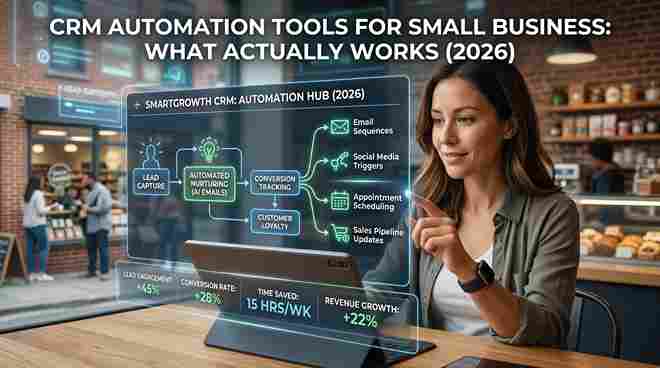
CRM automation is software that handles repetitive customer-related tasks like follow-ups, lead tracking, and communication automatically.
That means when someone fills out a form, they don’t wait. They get a response instantly. Their data is logged. A follow-up is scheduled. No manual work needed.
This matters more now than it did a few years ago. Customers expect speed. According to Salesforce (2025), over 70% of customers expect businesses to understand their needs immediately. Without automation, that’s difficult to deliver.
Where Most Small Businesses Get It Wrong
Most people choose tools based on features. That’s where things go wrong.
Automation doesn’t fix a broken process. It amplifies it. If your lead flow is messy, automation just makes the mess faster.
Another issue is underestimating setup. Many tools look simple but take time to configure properly. We’ve seen small teams in the UK spend weeks trying to set up workflows they don’t fully understand.
Then there’s cost. Cheap tools often lack integrations. You end up paying more through add-ons or switching later.
This is where smart decisions matter.
Best CRM Automation Tools for Small Business (2026)
Let’s keep this practical.
If you run a service business or agency, tools like Go High Level make sense. They combine CRM, funnels, and automation in one place. The learning curve is real, but once set up, it replaces multiple tools.
If you’re new or want something easy, HubSpot is a safer choice. It’s simple to use and has a strong ecosystem. But pricing increases quickly as you scale.
For budget-focused users, Zoho CRM works well. It’s flexible and affordable, though the interface isn’t the easiest.
If your focus is email marketing, Active Campaign is strong. But it’s not a full CRM replacement.
And if you just want pipeline tracking without complexity, Pipedrive keeps things simple.
There’s no universal winner. It depends on how your business operates.
Go High Level vs HubSpot: Which One Should You Pick
This decision comes up often for a reason.
If you want full control and automation in one place, Go High Level is the better choice. It’s built for agencies and service-based businesses that rely on lead generation and follow-ups.
If you want ease of use and structured onboarding, HubSpot is easier to start with. It’s designed for teams that want something clean and reliable without much setup stress.
We’ve seen agencies in the US move away from HubSpot because costs increase fast. At the same time, startups stick with HubSpot because it’s easier to manage early on.
The decision comes down to complexity vs simplicity.
How to Choose the Right CRM with Automation
Before picking any tool, pause and look at your system.
Ask yourself a few simple questions.
Where do your leads come from? Ads, referrals, website forms—your CRM must connect with these.
How fast do you respond? If it’s not within minutes, automation isn’t optional anymore.
Do you need marketing automation or just sales tracking? This changes everything.
What happens after the sale? Many systems focus only on leads, not retention.
Most businesses skip this thinking step. That’s why they switch tools later.
CRM Automation Software vs Custom CRM Development
For most small businesses, ready-made CRM tools are enough.
They’re faster to set up, cheaper, and easier to manage.
But there are exceptions.
If your business has complex workflows or multiple departments, custom CRM development becomes a better option. This is common in industries like logistics or healthcare where processes don’t fit standard systems.
The trade-off is clear.
Custom systems give you control, but they require more time, budget, and maintenance.
The Real Cost of CRM Automation
Monthly pricing is only part of the story.
The real cost includes setup time, training your team, and integrating other tools.
According to Capterra (2025), nearly half of small businesses switch CRM systems within two years. That usually happens because the initial choice didn’t match the workflow.
Switching isn’t just annoying. It costs time, data, and momentum.
Choose carefully once.
Where CRM Automation Fails
This is something most guides ignore.
Automation fails when it replaces thinking.
If your pipeline isn’t clearly defined, automation won’t fix it. If your data is messy, your results will be too.
Another common issue is over-automation. Businesses remove the human touch completely. That usually hurts conversions.
One simple truth:
Automation works best when it supports people, not replaces them.
A Simple Setup That Works
If you want a practical starting point, keep it simple.
Capture leads through your website or ads. Connect that directly to your CRM.
Set up an instant follow-up through email or SMS. Within minutes, not hours.
Use a clear pipeline with a few stages. Don’t overcomplicate it.
Add basic retention like follow-ups or reminders after the sale.
This setup alone solves most problems small businesses face.
Conclusion
Choosing CRM automation tools for small business isn’t about picking the most advanced platform. It’s about finding something that fits how you actually work.
If you’re just starting, go simple. If your system is growing complex, look at deeper automation or custom solutions. But don’t delay the decision.
Because every missed follow-up is a lost opportunity.
Pick the system that makes your process easier, not harder—and stick with it.
FAQ SECTION
1. What is CRM automation in simple terms?
CRM automation is software that automatically manages customer tasks like follow-ups, lead tracking, and communication. It reduces manual work and helps businesses respond faster and more consistently.
2. Which CRM is best for small businesses?
It depends on your needs. HubSpot is best for beginners, while Go High Level suits businesses that need strong automation and marketing tools.
3. Is CRM automation expensive?
Basic tools can be low-cost or even free, but total cost includes setup, integrations, and training. Always consider the full picture.
4. How long does it take to set up a CRM system?
Simple setups can take a few hours. More complex systems with automation may take several days or even weeks to fully configure.
5. Can small businesses benefit from CRM automation?
Yes. It helps manage leads, improves response time, and ensures no opportunity is missed, especially as the business grows.